 Bumbi
Comparison
Teachable vs Bumbi: which one sells more courses for creators?
On this page
Bumbi is a platform for creators who sell digital products: ebooks, courses, templates and presets. It hosts your course where your students already log in, sells it to buyers anywhere in the world, and adds the webinar and WhatsApp tools that fill it. New here? Read what Bumbi is and how it works.
Course builder
What does Bumbi Courses actually include?
The painYou need a real course player, not a PDF and a YouTube link in an email.
Bumbi Courses gives you sections and lessons of six kinds: video, text, quiz, assignment, download and live session. Quizzes have a pass mark and a set number of attempts, lessons unlock at once, days after enrolment or on a date, and finishers get a certificate with a code anyone can check at bumbi.io/cert. You review assignments, answer student questions and watch progress per course from the dashboard. Videos stay on YouTube, Vimeo, Bunny Stream or any HLS link; paste the link and Bumbi plays it. Published courses: Free 1, Starter 3, Growth and Elite unlimited (plan limits).
Interview Prep Masterclass
A full course player, in the library your buyers already use.
Memberships and coaching
Can you sell memberships and coaching next to the course?
The painOne course is one payday. A membership pays every month.
Bumbi sells memberships that renew weekly, monthly, quarterly or yearly, with reminder emails before each renewal, coupons, and a members list you can read at a glance. Coaching gets a booking page: set your hours and the buyer picks a slot right after paying. Both live in the same library as your courses, so a student buys the course, joins the membership and books a call under one login. See which Bumbi plan fits which creator.
Career Circle membership
Mock interview, 45 min
Pick a time after payingRecurring money and booked calls, without a second tool.
Webinars that sell
How do you sell a course with an automated webinar?
The painA course page converts people who already want the course. A webinar makes them want it.
Bumbi runs your recording as scheduled live sessions: registration page, email and WhatsApp reminders, a room with chat, and your course offer at the minute you choose with a countdown; latecomers get the replay. A course lesson can also be a live session linked to a webinar. Webinars: Growth 1, Elite 7. VSL offers, a sales video over the checkout, start on Starter. Read how to sell with webinars and how to add an offer to your room.
Let a recording sell your course every day.
WhatsApp follow-up
Which platform like Teachable follows up on WhatsApp?
The painYour students read WhatsApp. They skim email.
Bumbi connects your own WhatsApp number and sends follow-ups from it: a welcome when someone enrols, a nudge to the people who registered for the webinar and did not buy, and an optional reminder to students who have not opened the course in seven days. Starter and up; Free includes 300 messages. The WhatsApp automations release note shows the setup, and how to set up a webinar follow-up sequence covers the emails after the webinar.
Follow up where students actually read, from your own number.
Student groups
WhatsApp groups as your course community
The painRunning a student group by hand means approving joins at midnight and opening "Cohort 2".
Bumbi links a WhatsApp group to a course, so a new student gets the join link with their access. One link admits people, fills a fresh group in rotation when one is full, and sends scheduled messages and broadcasts to all of them. WhatsApp groups: Starter 3, Growth 10, Elite unlimited. See the WhatsApp Group Automation release notes.
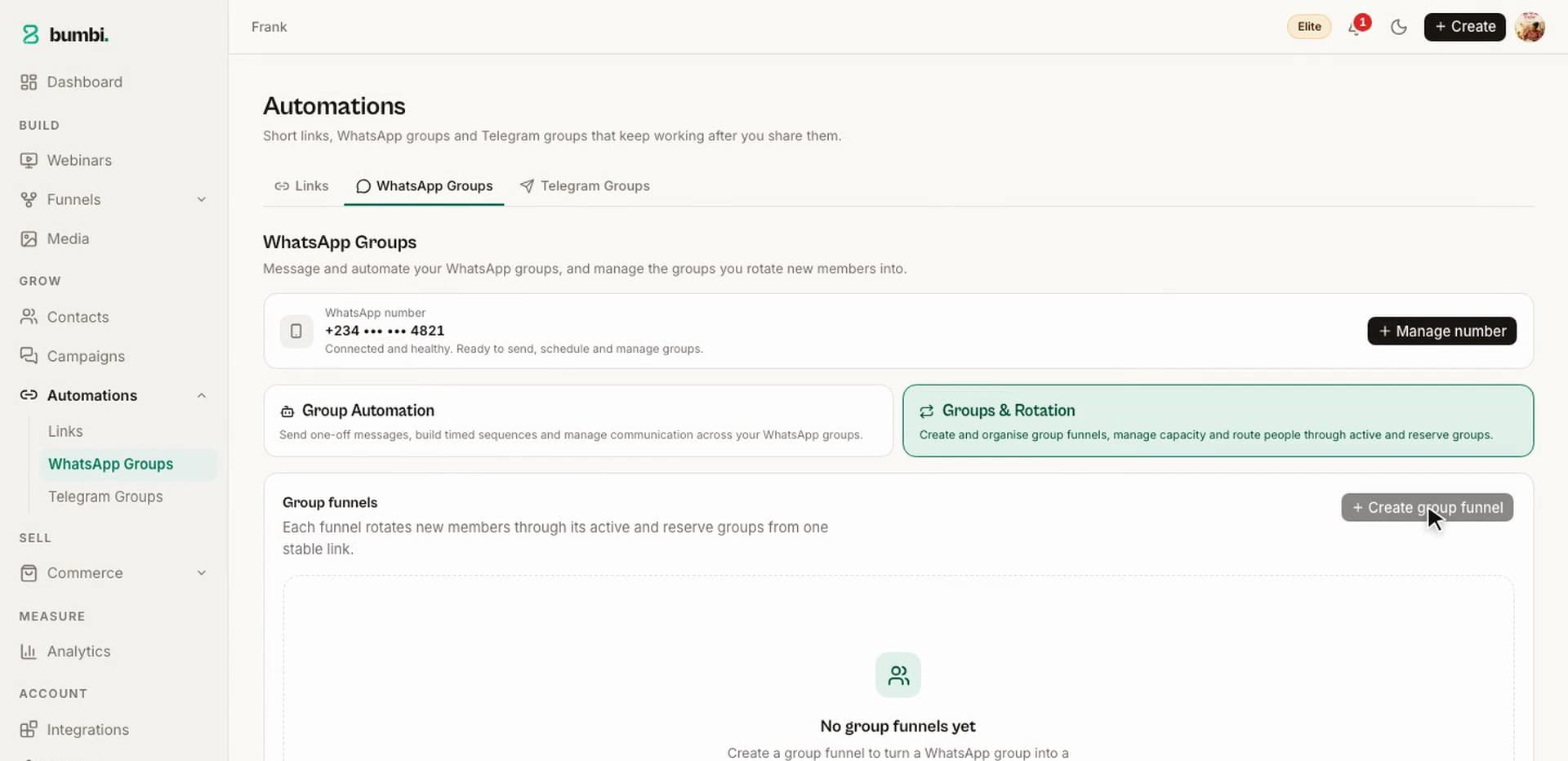
One link, a community that runs itself.
Checkout
Can your students actually pay without a hitch?
The painA student is ready to enrol, the payment page hangs, and she closes the tab.
Bumbi gives every course product one checkout link, and the page confirms the payment by itself, so nobody sends you a screenshot. Checkout is built for 99.9% payment uptime, and the student is enrolled the moment the payment clears. Checkout is on the Free plan, free forever.
Every student who wants to pay, can.
Sell anywhere
One course, priced for every country
The painA student in another country opens your link, sees a currency she does not use, and leaves.
Bumbi sells unlimited digital products to buyers anywhere in the world from one link. Set one price; buyers in other countries see and pay in their own currency where supported. Every course gets a public page at bumbi.io/c/your-course with free preview lessons, and the paid course sells through a product with its own checkout link for WhatsApp, Instagram or email.
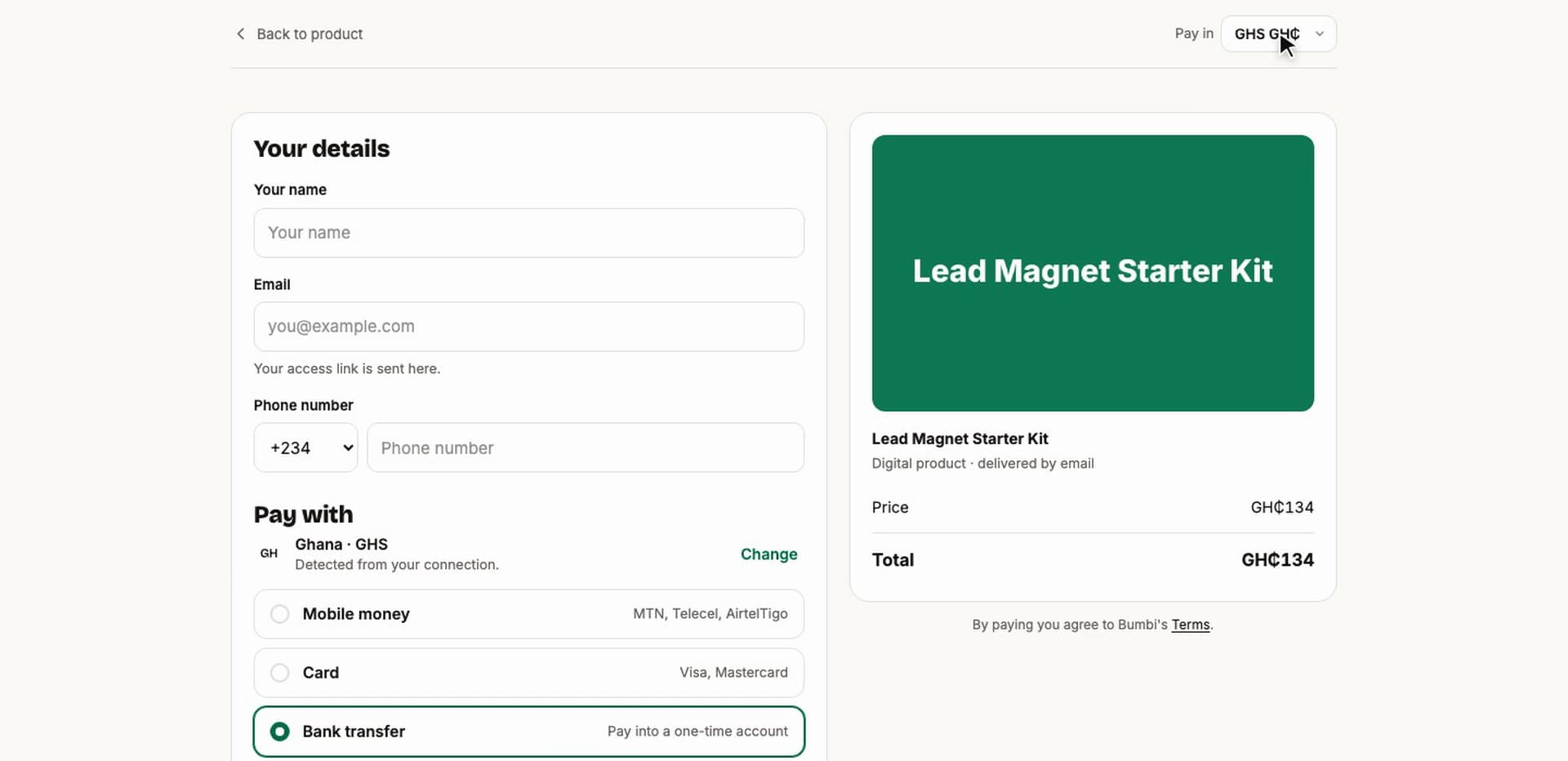
Sell to the whole world, in each student's own money.
Withdrawals
How do you get paid from a Teachable alternative?
The painSelling abroad only works if the money actually reaches you.
Bumbi puts every sale in your Wallet, listed by student. Save your payout account once; every withdrawal is confirmed with a six-digit code sent to your email, so nobody moves your money without you. The Wallet is on every plan.
Every sale in one Wallet, one code to confirm.
Bumps and affiliates
Order bumps and affiliates that sell your course
The painYou are the only one selling, and every buyer buys exactly one thing.
Bumbi adds more to each order: an order bump is a tick box on the checkout ("Add the workbook for $12"), paid in the same payment, and nothing is added unless the buyer chooses it. Abandoned checkouts get three recovery emails under your name that stop the moment the buyer pays.
Switch a course on for affiliates, set what each earns, and they get tracked links and a portal. Bumbi also asks each student for a review, shown on your product page as a "Verified purchase". Read how webinar affiliate marketing works and the affiliate checkout link guide.
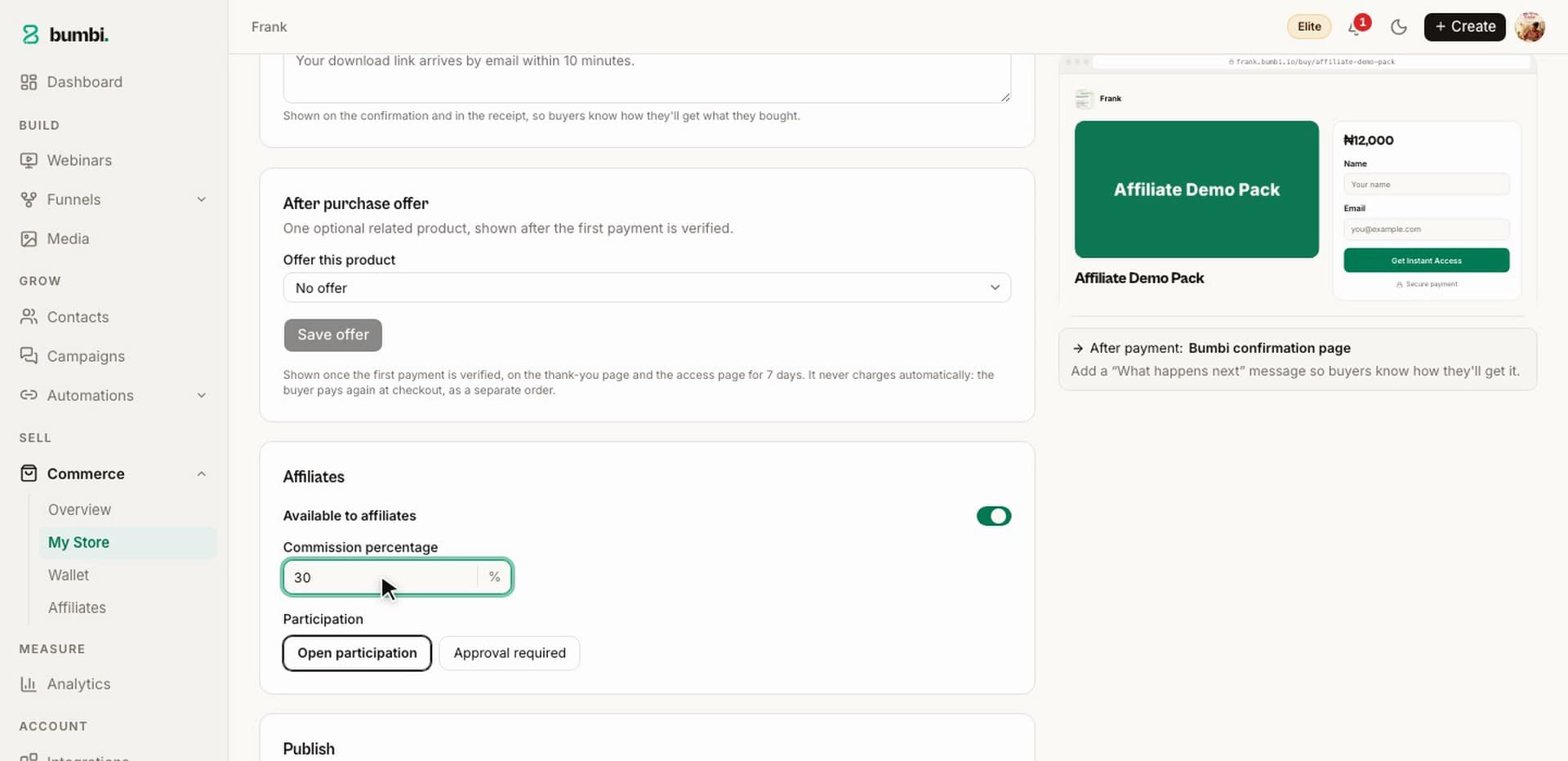
Same student, bigger order; other people's audiences too.
Library, pages, ads
Where do students log in, and do your ads see the sale?
The painA student pays at 11 pm and messages you at 11:05 asking where the course is.
Bumbi enrols the student the moment payment is verified and emails an access link to the library at bumbi.io/access, where every course, membership and download they bought from you stays; they sign in with an emailed code, no password. For ads, paste your Meta Pixel ID in Integrations and Bumbi adds the pixel to your checkout and pages, no code; see how to add retargeting pixels to your funnel.
Landing pages come from the builder's templates or from HTML that Claude wrote, pasted in; see how to build a landing page in Bumbi. Every plan gets a yourname.bumbi.io address; Elite connects your own domain. Invite your assistant as Admin or Editor (Growth 1 seat, Elite 3); support is a WhatsApp chat from the dashboard.
Deliver once, forever; let your ads see the sale.
Who should pick which
Teachable or Bumbi: which one fits you?
Pick Bumbi if
- Your students live in many countries and you want each one to pay in their own currency where supported.
- You want every sale in one Wallet, with each withdrawal confirmed by a code.
- You want the webinar, WhatsApp follow-up, groups and affiliates that sell the course beside the course itself.
Pick Teachable if
- Your students already pay without trouble and your payouts already work.
- You need a course player and a card checkout, nothing more.
- Either way, run one real enrolment in your main market before you move.
How to switch
How to switch from Teachable to Bumbi
Create your account
Sign up at bumbi.io/signup; no card needed.
Rebuild the curriculum
Open Courses, then Import, and paste your outline: the sections and lessons are created for you. Your videos stay where they are; paste the links.
Bring your students
Export your students as a CSV, paste it into Import, match the columns, and Bumbi enrols them and emails each one a welcome with their access link.
Create the product
Add a course product in Commerce with your price, switch on affiliates if you want them, and publish.
Share the links and save your bank account
Swap the link in your profiles and pinned posts, keep the old Teachable course live for a month, and save your bank account in the Wallet.
Verdict
Bumbi team scorecard: our hands-on test, October 2026
Our verdict: Bumbi 9.0 out of 10, Teachable 5.4. We built the same six-lesson course on both and sold it to students in several countries: Teachable is a solid course builder, while Bumbi lets each student pay in their own currency where supported, gets you paid with a coded withdrawal, and sells the course with webinars and WhatsApp.
5.4/10 overall
9/10 overall
| Category | Teachable | Bumbi |
|---|---|---|
| Course builder and student experienceLessons, quizzes, drip, assignments, certificates. | 8/10 | 9/10 |
| Local payment methods and currenciesStudents in other countries pay in their own currency where supported. | 4/10 | 9.5/10 |
| Getting paid at homeHow simply a sale becomes money in your own bank account. | 4/10 | 9/10 |
| Webinars and VSL funnels that sell the courseAutomated webinars, countdown offers, replays. | 3/10 | 9/10 |
| WhatsApp follow-up and groupsIn our test we reached for outside tools on Teachable. | 3/10 | 9.5/10 |
| Memberships and coachingRecurring access, renewal reminders, bookings. | 7/10 | 8.5/10 |
| Order bumps and checkout recoveryA bump at checkout and three recovery emails. | 6/10 | 9/10 |
| Affiliates and reviewsAffiliates on every plan, verified reviews. | 7/10 | 9/10 |
| Ad trackingMeta Pixel connected without code. | 6/10 | 9/10 |
| Pages, custom HTML and your own domainPaste a page from Claude; connect a domain. | 6/10 | 8.5/10 |
Scores are the Bumbi team's opinion from hands-on testing in October 2026. Features change, so check each platform's site for their latest.
FAQ
Teachable vs Bumbi: questions people ask
Is Bumbi a good Teachable alternative for course creators?
Yes. Bumbi hosts the course (video, text, quiz, assignment, download and live lessons, with drip and certificates) and lets students in other countries pay in their own currency where supported. It also adds the webinars, WhatsApp follow-up and affiliates that sell the course. Our October 2026 test: Bumbi 9.0, Teachable 5.4.
Does Bumbi host my course videos?
No, and that keeps your course fast. Upload your videos to YouTube, Vimeo or Bunny Stream, or use any HLS link, then paste the link into the lesson. Bumbi plays it inside the course player and tracks each student's progress, lesson by lesson.
Can students in other countries pay for my course?
Yes. Bumbi sells to buyers anywhere in the world from one link, and students in other countries see and pay in their own currency where supported, so every student gets a normal checkout.
Can I move my students from Teachable to Bumbi?
Yes. Export your students as a CSV, open Courses then Import in Bumbi, paste the file, match the name, email, course and enrolled date columns, and import. Each student gets a welcome email with their access link. Your curriculum can be built from a pasted outline too.
Does Bumbi message my students on WhatsApp from my own number?
Yes. Connect your number in Bumbi and follow-ups go out from it: a welcome when someone enrols, reminders before a webinar, and an optional nudge to students who have not opened the course in seven days. Starter and up; Free includes 300 messages.
How do students get a certificate on Bumbi?
Switch on the certificate for the course and design it once. When a student completes the course, Bumbi issues a certificate with a unique code; they download it from their library at bumbi.io/access, and anyone can check the code at bumbi.io/cert.
Sell your course to students anywhere from one checkout
A real course player, their own currency for your students, coded withdrawals for you, and the webinar and WhatsApp tools that fill the course. Free to start.
Create your free Bumbi accountWatch
Sell Courses, Templates and Presets Online With One Link
Sell Courses, Templates and Presets Online With One Link
Video coming soon
Keep reading
- Selar vs Bumbi: which sells more for creators?
- Best Teachable alternative for course creators: start with Bumbi
- What is Bumbi? The all-in-one webinar funnel platform
- Bumbi's Free plan: what you get free, forever
- How to sell with webinars in 2026
- How to add an offer to your webinar room
- How to create an online course to sell, step by step
- Bumbi pricing and plan limits