 Bumbi
How to Create an Online Course to Sell, Step by Step
Plan, record and build a course people finish, then put it on sale with automatic enrolment.
Quick answer: To create an online course, write the one result it delivers, break it into 5 to 12 short lessons, record each lesson on your phone or screen, upload the videos to a video host, add quizzes or tasks, and put it all in a course builder linked to a checkout. You can plan and record a first course in two to three weeks.
Creating a course sounds like a production: studio lights, a script for every word, a 40 hour curriculum. The courses that sell and get finished are usually far simpler. A clear goal, short lessons, a task after each one, and someone who clearly knows the subject.
This guide walks you through how to create an online course to sell, from the plan to the recording to the upload, then shows how to put it on sale with Bumbi Courses.
Step 1: Plan the course around one result
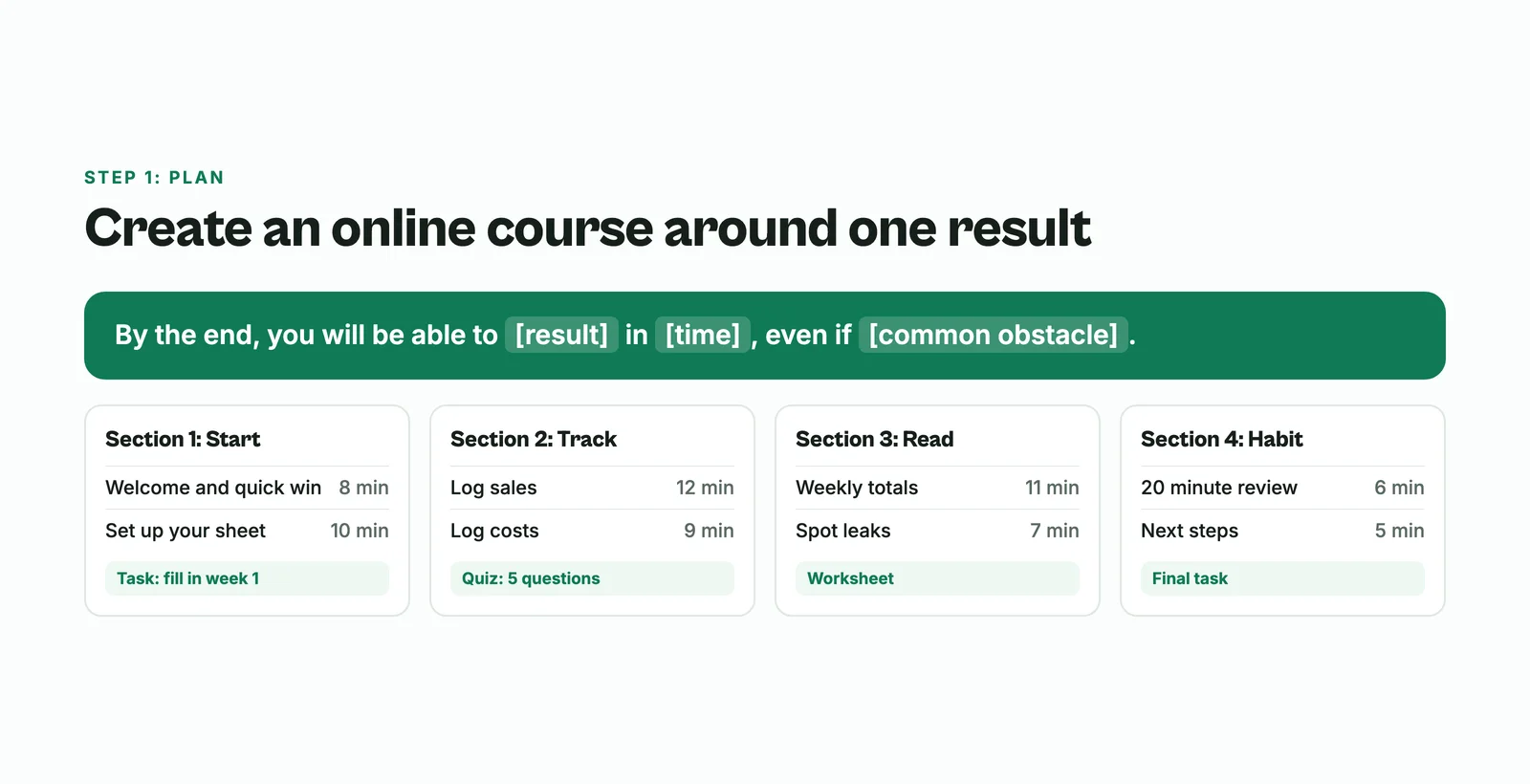
- Write the promise. "By the end, you will be able to [result] in [time], even if [common obstacle]." Example: "By the end, you will be able to keep your shop's books in one spreadsheet in 20 minutes a week, even if you hate numbers."
- Describe the student. Where are they starting? What have they tried? What do they need to have (a laptop, an app, a camera)?
- List the steps from start to result. Each step becomes a lesson. Group lessons into 3 to 5 sections.
- Choose the practice. One quiz, task or worksheet per section is enough to keep students moving.
Step 2: Outline every lesson
For each lesson, write three lines: what the student will learn, the example you will show, and what they should do after watching. Keep lessons short, roughly 5 to 15 minutes. A long lesson is usually two lessons.
This is also where AI tools help. ChatGPT or Claude can turn your notes into a lesson list, suggest quiz questions, or tidy a worksheet. The examples and the teaching should still be yours; that is what students pay for.
Step 3: Record the lessons
- Gear: your phone, a window for light, and a cheap clip-on microphone. Sound matters more than video.
- Screen lessons: use any screen recorder for software or spreadsheet lessons.
- Talk from bullet points, not a full script. It sounds natural and saves hours.
- Record in batches. Three or four lessons in one session, same setup, same light.
- Do not chase perfect. A small stumble is fine. Students care that the lesson works.
Step 4: Upload the videos to a video host
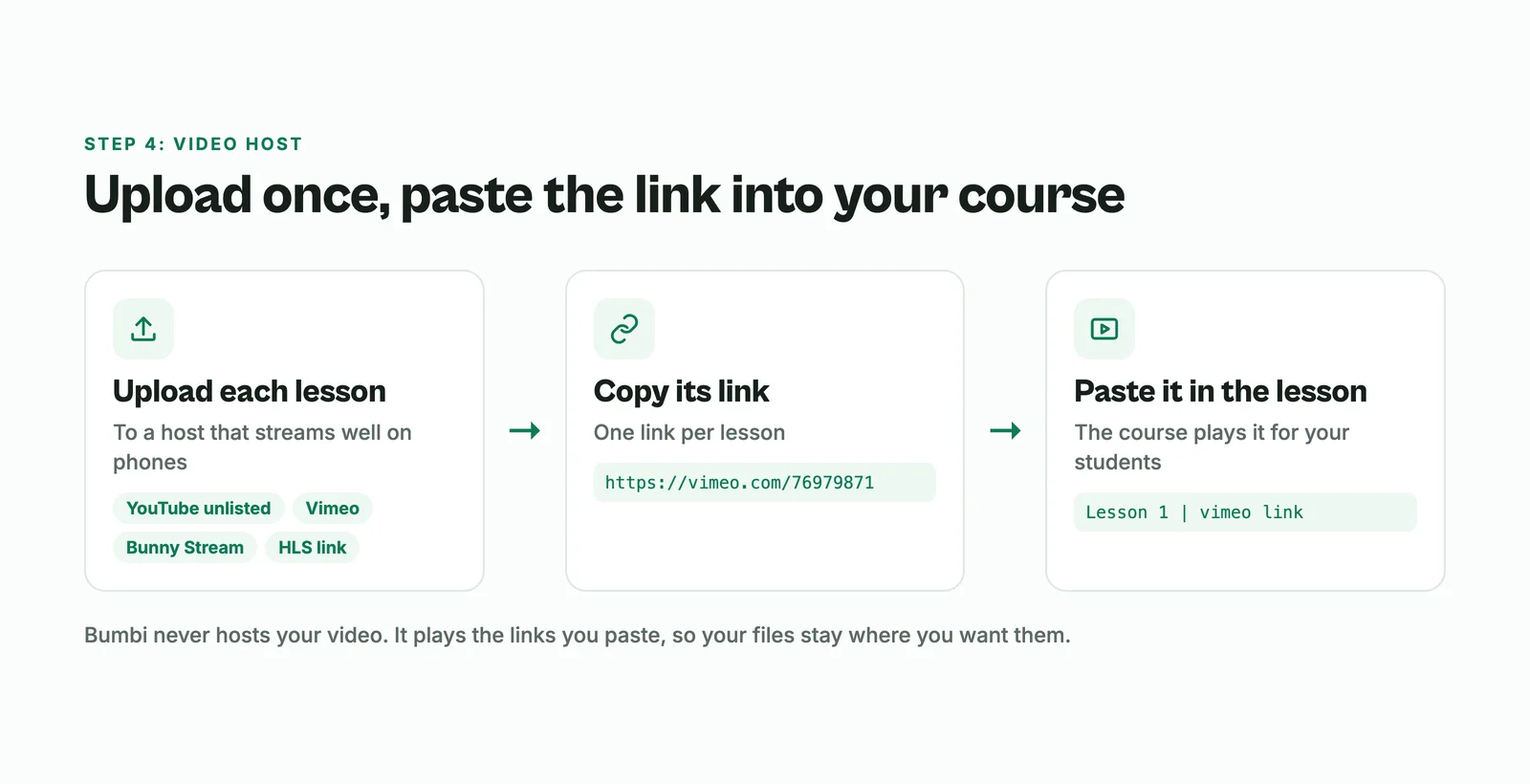
Course videos need a host that streams smoothly on phones. Common choices are YouTube (as unlisted videos), Vimeo, Bunny Stream, or any HLS streaming link. Upload each lesson there and copy its link. You will paste those links into your course.
Step 5: Build the course in a course maker
A good course builder lets you mix lesson types, not just videos. Here is what that looks like in Bumbi Courses:
- Create the course with a title, subtitle, cover and description.
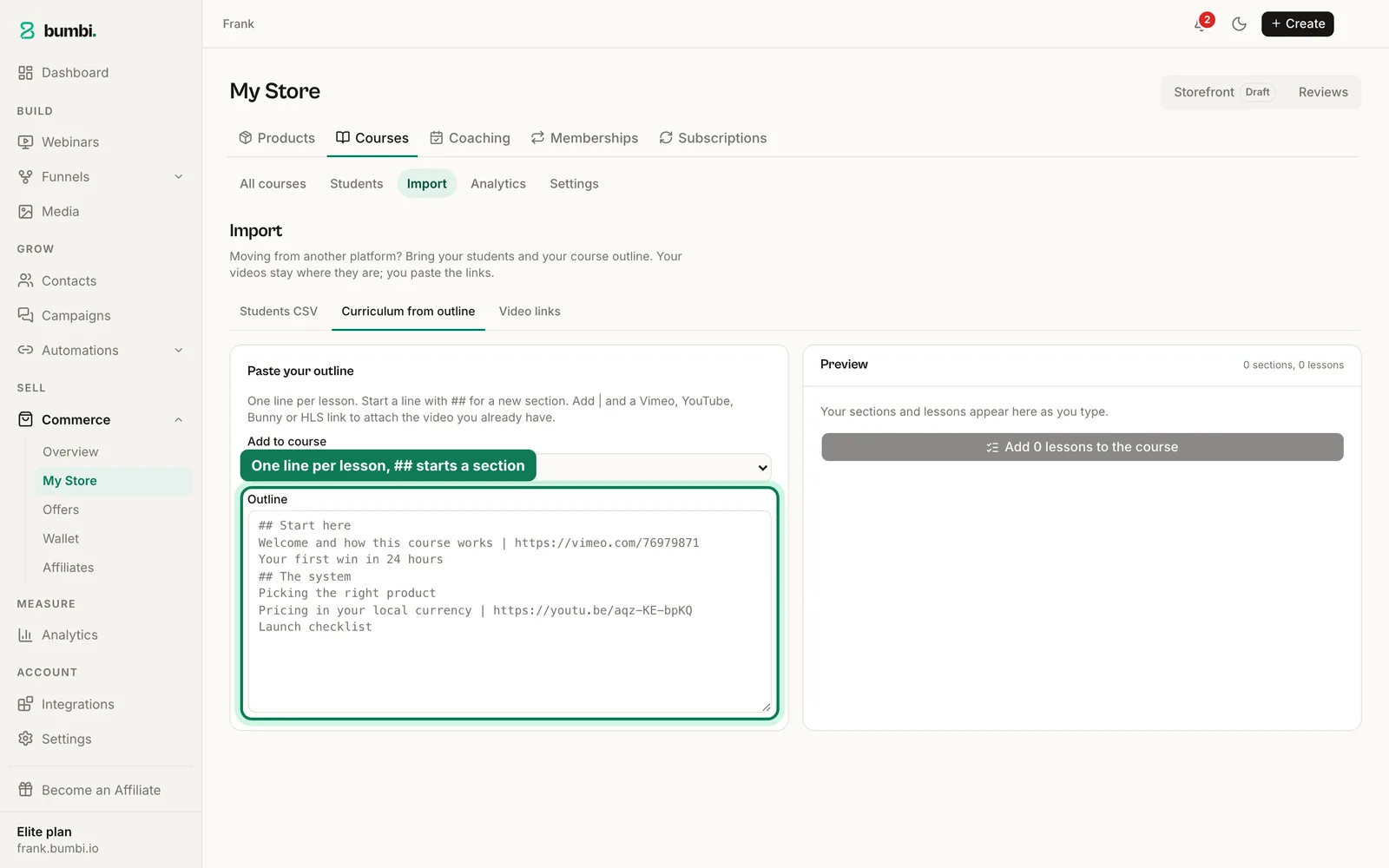
- Paste your outline to build it fast: one line per lesson, a line starting with "##" starts a section, and "Lesson title | video link" attaches the video.
- Mix lesson types: video (from YouTube, Vimeo, Bunny or HLS), text, quizzes, assignments, downloads (PDFs, worksheets, spreadsheets) and live lessons.
- Set up quizzes with single choice, multiple choice or true or false questions, a pass mark and the number of attempts.
- Choose the pace. Open every lesson at once, a number of days after a student enrols, or on set dates.
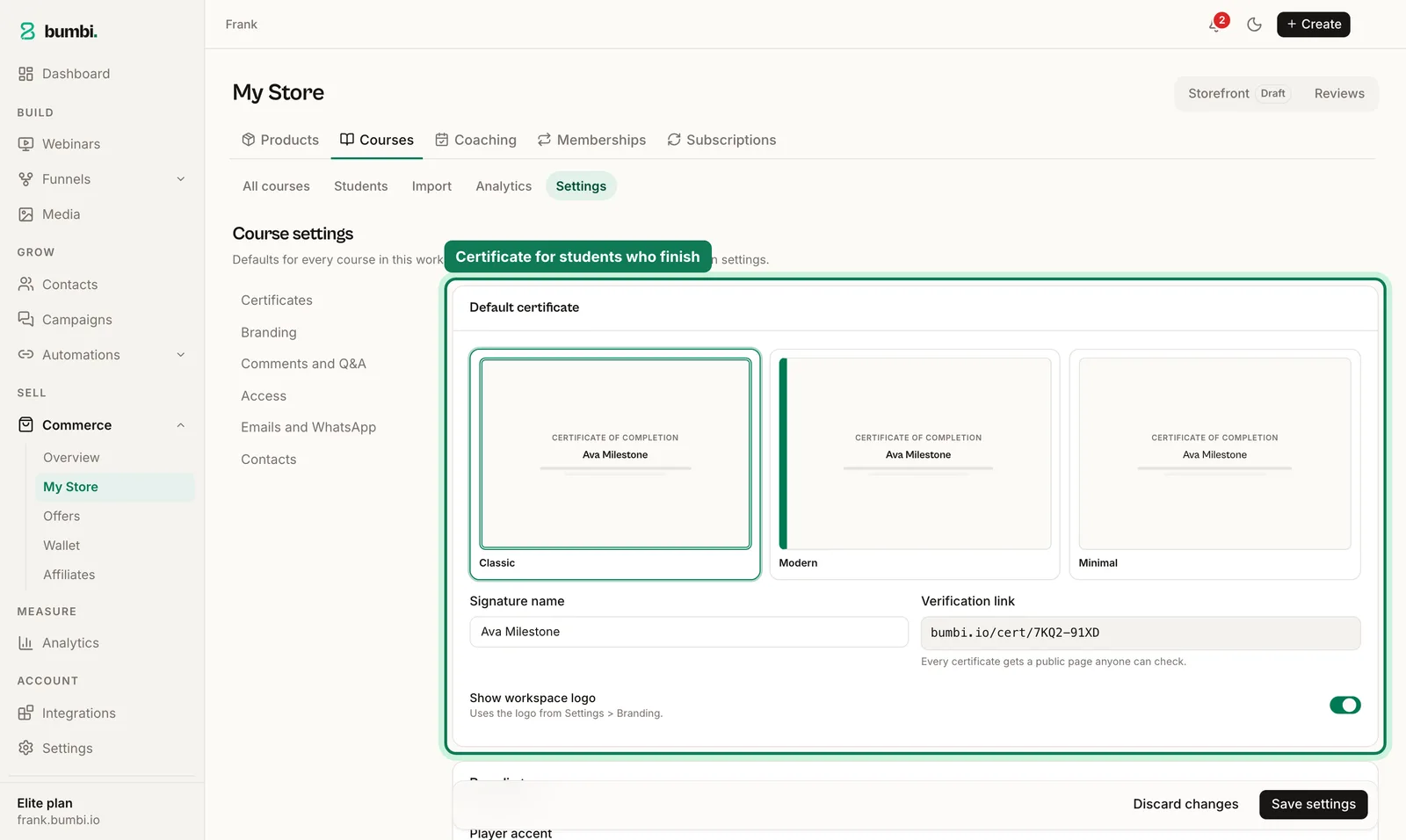
- Add a certificate for students who complete every lesson or pass the quizzes.
Bumbi never hosts your video. It plays the links you paste, so you keep your files where you want them.
Step 6: Put the course on sale
- Link the course to a product with a price. That product has its own checkout link.
- Every paid order enrols the student automatically. No adding people by hand.
- Buyers in other countries see and pay in their own currency where supported.
- Sell it with an automated webinar, a video sales letter page, or simply the checkout link in your posts. The full plan is in how to sell courses online.
You can also make a course free to grow your list, or include it in a membership with monthly or yearly access.
Is there a free online course maker?
Several tools let you start free. Bumbi has a Free forever plan, and plans differ in how many courses you can publish, so check pricing for the current limits. Whatever tool you use, the expensive part of a course is your time, so spend it on the plan and the teaching, not on the software.
Create online course lessons people actually finish
A course that people finish sells the next one for you, because finished students leave reviews and come back. A few habits make the difference:
- Give a quick win in lesson one. Something the student can do in ten minutes that already helps.
- End every lesson with one action. "Do this now, then move on" beats "think about this".
- Show progress. A curriculum that ticks off as they go, and a certificate at the end, gives people a reason to keep going.
- Answer questions inside the course and turn the common ones into short extra lessons.
- Release lessons on a schedule if students tend to rush and drop off. A new lesson every few days creates a rhythm.
Mistakes when creating a course
- Making it too long. Students who do not finish do not leave reviews or buy your next course.
- No practice. Watching is not learning. Add a task to every section.
- Recording before validating. Pre-sell to a few students first, then record with them in mind.
- Bad audio. People forgive grainy video. They do not forgive sound they cannot hear.
New to digital products in general? Start with how to create digital products.
Your first course can be smaller than you think. Start on Bumbi and build it in Bumbi Courses this week.
Frequently asked questions
- How do I create an online course?
- To create an online course, write the result it delivers, split it into short lessons, record each one, upload the videos to a video host, add quizzes or tasks, and build it in a course maker linked to a checkout. Many people create online course content in two to three weeks this way.
- How long should an online course be?
- As short as it can be while still delivering the result. Many good courses have 5 to 12 lessons of 5 to 15 minutes each.
- Can ChatGPT create a course?
- It can help you outline lessons, write quiz questions and tidy worksheets. The teaching, examples and experience should be yours, because that is what students pay for.
- Where should I host my course videos?
- Use a video host such as YouTube (unlisted), Vimeo, Bunny Stream or an HLS link, then paste the links into your course. Bumbi plays those links and does not host video itself.
- Is there a free online course maker?
- Several tools offer free plans. Bumbi has a Free forever plan; check the pricing page for how many courses each plan can publish.
- Can I make money creating online courses?
- Yes, when the course solves a problem your audience has and you sell it with teaching first, such as a free lesson or an automated webinar.
- What is Bumbi?
- Bumbi is a platform for creators who sell digital products: ebooks, courses, templates and presets. Bumbi Courses lets you build lessons, quizzes and certificates and enrols paid students automatically.

Written by
Ava Milestone
Ava writes the Bumbi guides on selling digital products.
Start Doing More With Bumbi Funnels
Now you can simply build better pages, create better funnels and make more sales online
Related
Video Sales Letter: What a VSL Is, a Script and an Example
A video sales letter sells in the order you choose. Here is the 7 part script, a worked example and how to publish a VSL page that converts.
Bulk WhatsApp Messages: How to Send Safely to Your Own Buyers
What WhatsApp allows, why bulk senders get numbers blocked, and how sellers reach every buyer safely from their own number.
How to Build a Membership Website Without Code
What a membership site is, the types that work for creators, how to price it, and how to build one with renewals and access handled for you.