 Bumbi
How to Receive International Payments for Digital Products
Buyers abroad want to pay you, but your bank is local. Here is how to receive international payment for digital products with one checkout link, in their currency and yours.
Quick answer: To receive international payment for a digital product, sell through a checkout that shows each buyer a price in their own currency and lets them pay with a method that works where they live. On Bumbi you set one price in your local currency, leave automatic conversion on, share one checkout link, and withdraw your earnings to your own bank account in your home currency.
No foreign bank account, no company registered abroad, and no asking a relative overseas to collect money for you.
If you have ever had a message like "I'm in Canada, how do I pay you?", you know the problem. Your audience is global because the internet is global. Your bank account is not. This guide shows you how to accept international payments for ebooks, courses, templates and presets, what buyers abroad see, and how the money gets back to you.
How to receive international payment as a creator
There are three common ways creators try to get paid from abroad, and they are not equal:
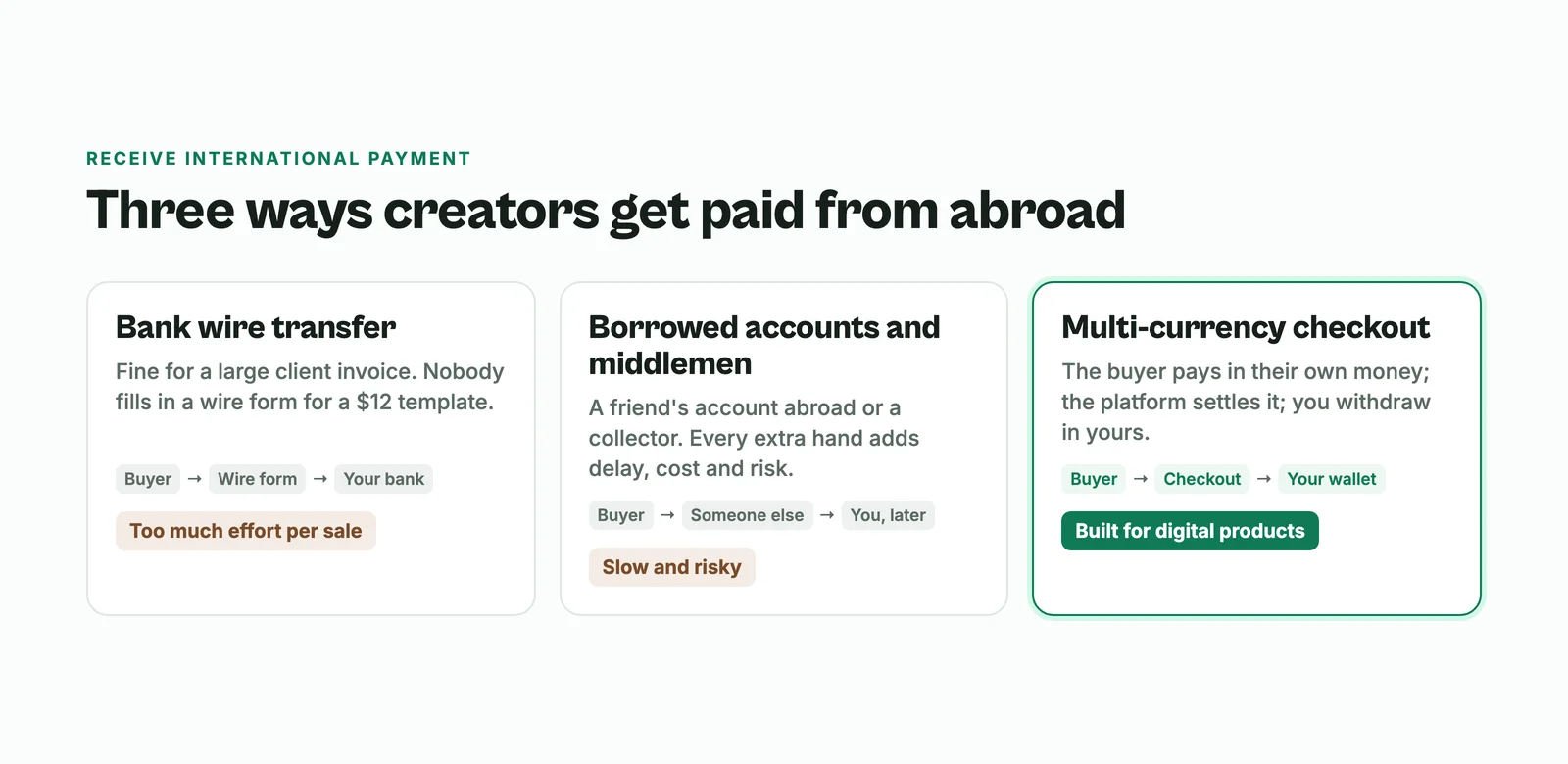
- Bank wire transfers. Fine for a large invoice from a client, painful for a buyer who wants a $12 template. Nobody fills in a wire form for an ebook.
- Borrowed accounts and middlemen. A friend's foreign account or a service that collects for you. Every extra hand adds delay, cost and risk.
- A multi-currency checkout. The buyer pays on a checkout page in their own money, the platform settles it, and you withdraw in yours. This is the one built for digital products.
The third option is the only one where a stranger on the other side of the world can buy at midnight without talking to you first. That is what makes it work for products that sell while you sleep.
Why selling abroad is usually so hard
Many global checkout tools do not open accounts for sellers in large parts of the world, or will not pay out to a local bank. So creators end up with workarounds: a virtual dollar card, a marketplace that pays months later, or a relative abroad. Each one puts someone between your buyer and your bank, and each one takes a slice on the way through.
A checkout that handles the currency for you removes that middle step. The buyer pays in their money, you get paid in yours.
Who buys digital products from creators in other countries?
More people than you might think:
- People from your home country living abroad, who want content in their own context: a parent abroad buying a language pack for their kids, or someone far from home buying a recipe ebook from their region.
- Neighbours across a border, who face the same problems your product solves.
- Anyone who found you on YouTube or TikTok and wants the template, the preset or the class. Those platforms do not care where you live.
Example: a career coach sells a CV template pack priced in her local currency. A buyer in Canada opens the same link, sees the price in US dollars, pays by card and gets the files at once. The coach sees the sale in her dashboard and the money in her wallet, and never touched a currency converter.
How to accept international payments on Bumbi
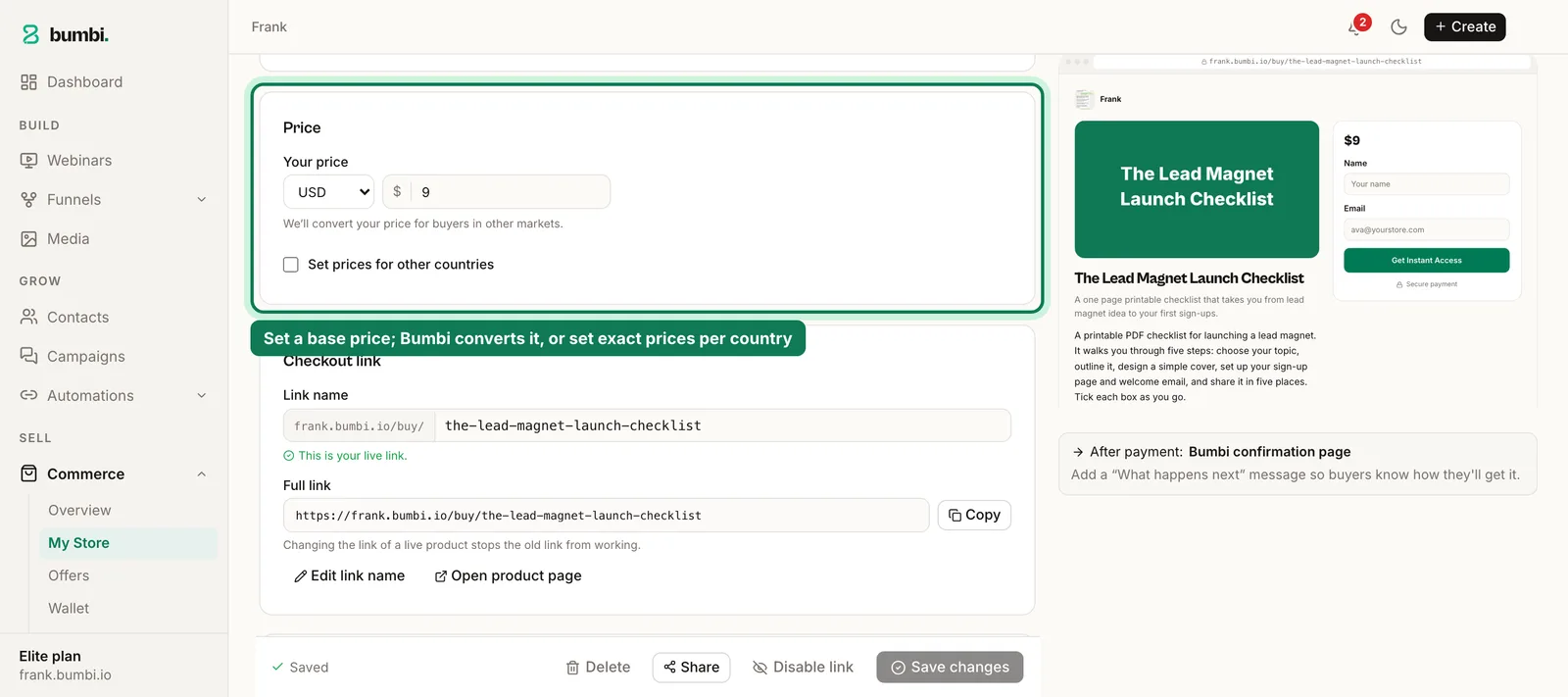
- Open Commerce, then My Store, and open your product (or add a new one).
- In the Price section, set your base currency and type the price.
- Leave automatic conversion on. Bumbi works out the price for buyers in other countries from your base price.
- Set exact prices if you want them. Tick Set prices for other countries and type them. A round $9 often reads better than a converted $8.73.
- Click Save draft, then Publish, and share the checkout link.
What does a buyer abroad see?
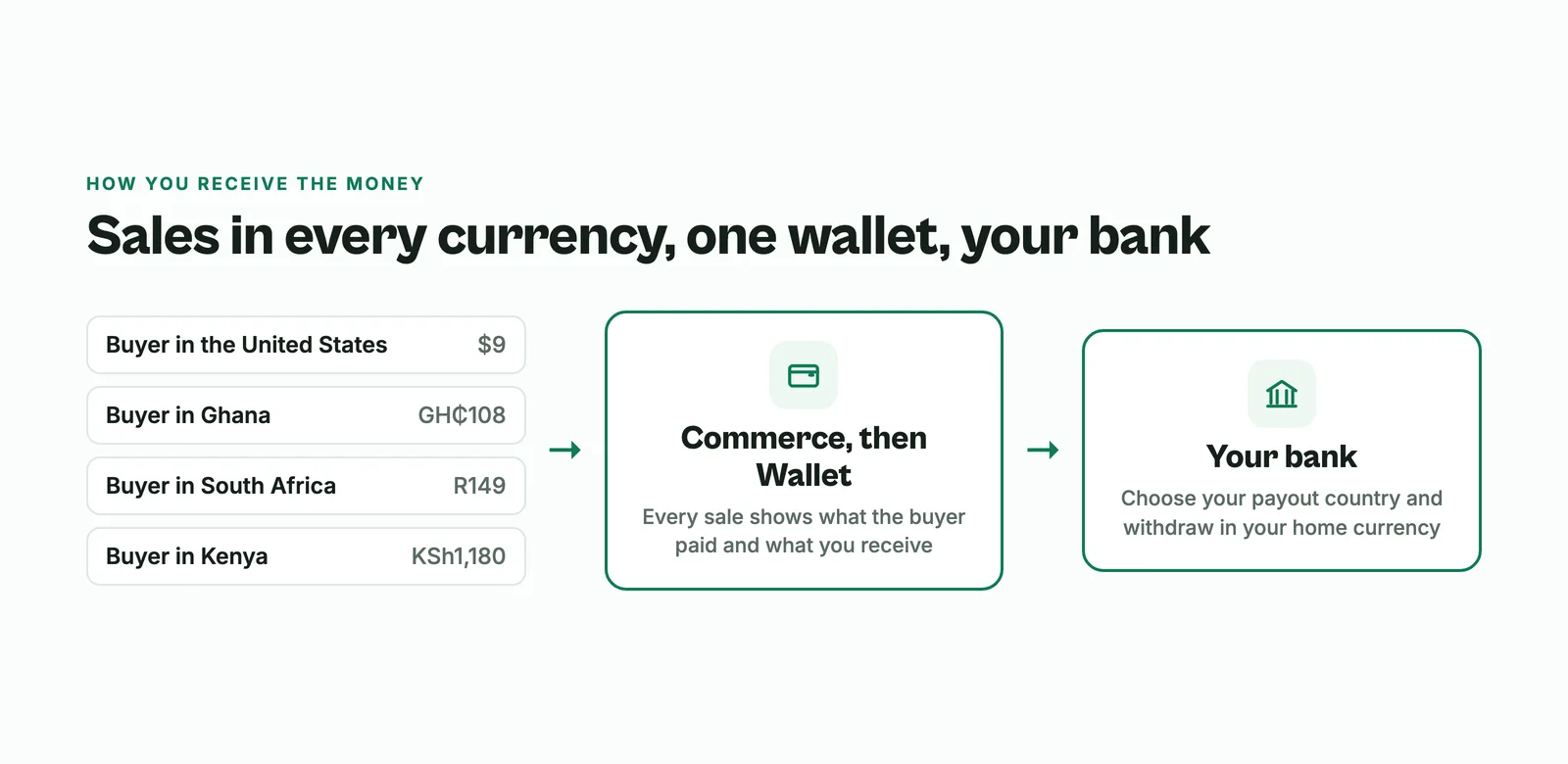
They open the same checkout link you share with everyone. The checkout picks their country and shows the price in their currency, with a Pay in switch if they want to change it. The top of the checkout says plainly which currency they are paying in.
- Buyers in the United States and most other countries pay in US dollars by card.
- Buyers in supported local currency countries pay in their own money with the methods people there use, such as bank transfer, mobile money, instant bank payment or card. Naira, cedis and rand are among the currencies the checkout can show.
A buyer in Texas never sees a price in a currency they do not use, and a buyer in Accra never has to work out an exchange rate.
Do I get charged for receiving international payments?
Any payment that crosses currencies has costs somewhere: conversion, card processing, payouts. What matters for you is that the numbers are clear. On Bumbi, every sale shows what the buyer paid and what you receive, so you are never guessing. Plan details are on the pricing page.
How do I receive the money?
Open Commerce, then Wallet. Choose your payout country and add your bank account. Sales from every currency collect in your wallet, and you withdraw to your bank in your home currency. Your overview shows sales in US dollars so you can read your numbers at a glance, and the Wallet shows what you can withdraw.
How to reach buyers abroad
- Write prices that read well twice. "8,000 in local money (about $9)" in a caption tells both audiences what to expect.
- Put your checkout link in your YouTube descriptions and TikTok bio. Those are often where the first foreign buyers come from.
- Write the sales page for a stranger. Buyers abroad do not know your history. How to build a sales page has the structure.
- Run a webinar on a schedule that suits other time zones and sell at the end. How to turn a YouTube video into a webinar shows how to start from a video you already have.
- Show your whole catalog in one place with a storefront, so a buyer from abroad can browse everything.
Mistakes to avoid
- Asking foreign buyers to pay into a local account "and I will sort out the conversion". They will not.
- Quoting prices only in your currency in content aimed abroad. Add the dollar figure.
- Promising delivery "within 24 hours". With files on your product, delivery is instant, and that is a selling point for a nervous first-time buyer far away.
- Ignoring people who stopped at checkout. International buyers hit card checks and bank prompts more often. Bumbi sends checkout reminders automatically; here is how they work.
Have buyers abroad asking "how do I pay?" Start selling on Bumbi, publish your product and send them one link.
Frequently asked questions
- How can I receive international payment for digital products?
- Use a multi-currency checkout. On Bumbi you set your price in your own currency, buyers abroad see and pay a price in their currency, and you withdraw to your bank in your home currency. That is the simplest way to receive international payment without a foreign account.
- Do I need a dollar account to sell in dollars?
- No. Buyers pay in US dollars on the checkout and you withdraw in your own currency to your own bank account.
- Can I set a different price for buyers in other countries?
- Yes. Tick Set prices for other countries on the product and type the exact price for each currency, or leave automatic conversion to work it out.
- How do buyers in other countries pay?
- Buyers in the United States and most other countries pay in US dollars by card. Buyers in supported local currency countries pay in their own money with local methods such as bank transfer, mobile money or card.
- Do I get charged for receiving international payments?
- Cross-currency payments always carry costs such as conversion and processing. On Bumbi each sale shows what the buyer paid and what you receive, and plan details are on the pricing page.
- What is Bumbi?
- Bumbi is a platform for creators who sell digital products: ebooks, courses, templates and presets. Its checkout shows buyers in other countries a price in their own currency where supported, and you withdraw in yours.

Written by
Ava Milestone
Ava writes the Bumbi guides on selling digital products.
Start Doing More With Bumbi Funnels
Now you can simply build better pages, create better funnels and make more sales online
Related
How to Sell Templates Online: Canva, Presets and Websites
Canva templates, Lightroom presets and website templates: how to package each, deliver it automatically and get paid by buyers anywhere.
How to Run a Paid WhatsApp Group or Class That Fills Itself
Sell the seat with a checkout link, let paid members join through a stable link, and schedule the lessons so the group runs on time without you.
How to Sell an Ebook on WhatsApp and Deliver It Automatically
To sell an ebook on WhatsApp, create it as a product in Bumbi, upload the PDF once, and share the checkout link in your chats, groups and status. The buyer pays with whatever is normal where they live, and the file lands in their inbox and on their access page the same minute. You never send a PDF b