 Bumbi
WhatsApp Payment Link: How to Get Paid and Deliver Automatically
Replace account numbers and payment screenshots with one link. Here is how to create a WhatsApp payment link that takes the money and delivers your product on its own.
Quick answer: A WhatsApp payment link is a checkout link you paste into a chat, so the buyer taps it, pays by card, bank transfer or mobile money, and you never have to send account details by hand. If you sell digital products, create the product on Bumbi, copy its checkout link, and send it on WhatsApp: the buyer pays in their own currency and gets the file automatically.
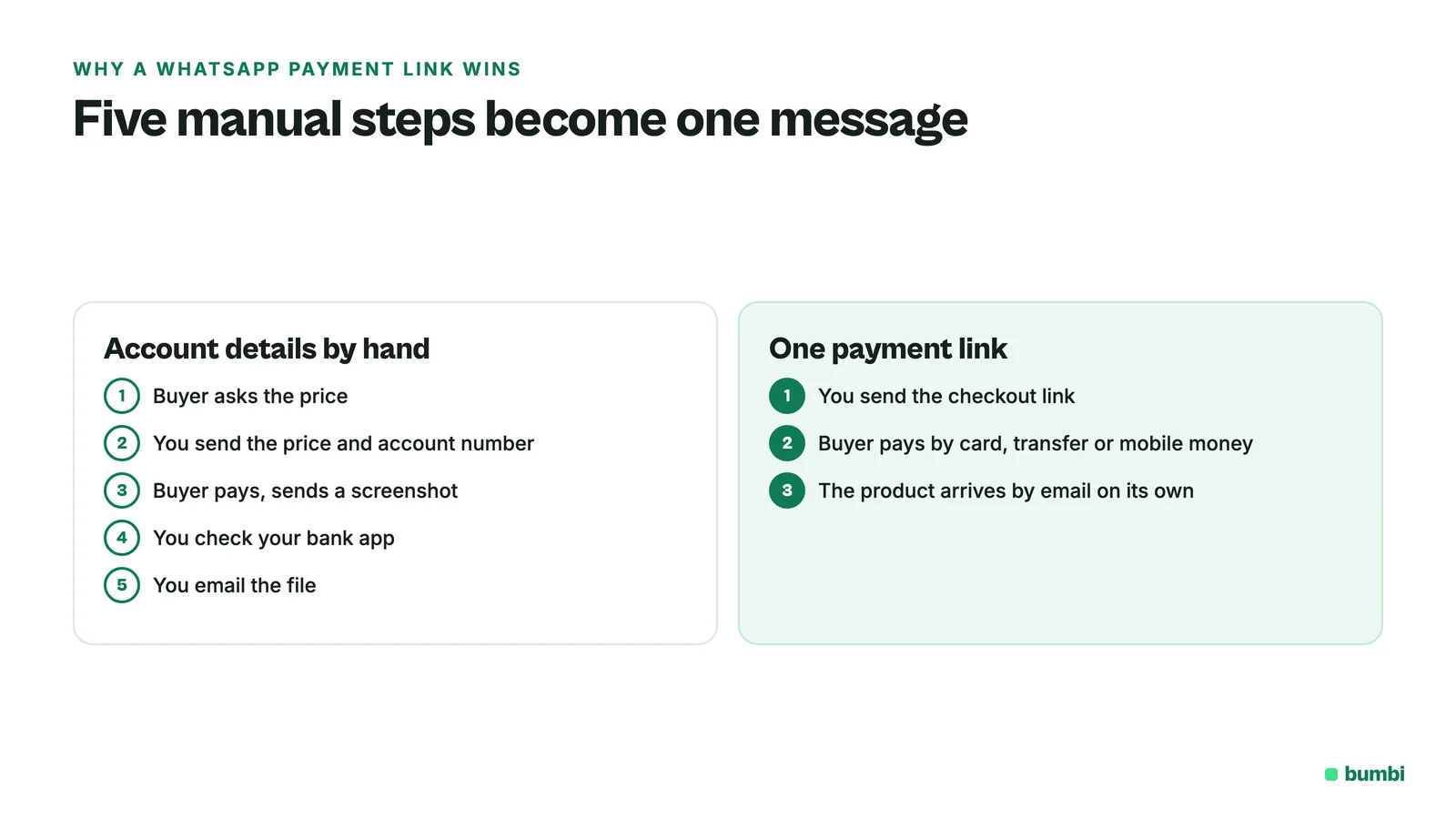
Someone sends you "How much is the ebook?" on WhatsApp. You reply with the price, then your account number, then wait. They pay, send a screenshot, you check your bank app, then you email the PDF. Do that ten times a day and selling turns into admin.
A payment link cuts that whole back and forth down to one message. This guide shows you how to create a WhatsApp payment link, what to write around it so people actually pay, and how to make the product arrive on its own after payment.
What is a WhatsApp payment link?
A WhatsApp payment link is an ordinary web link to a checkout page, shared inside a WhatsApp chat, status or group. The buyer taps it, the checkout opens in their phone's browser, and they pay there. WhatsApp only carries the link. The payment happens on the checkout page.
WhatsApp has its own payments feature in some markets, but whether you and your buyer can use it depends on where you both are. A payment link works anywhere your buyer can open a web page, which is why most sellers who take orders on WhatsApp use one.
Why a link beats sending account details
- No screenshots to check. The checkout confirms the payment, so you are not matching names in your bank app.
- The buyer can pay the way they prefer. Card, bank transfer or mobile money, depending on their country, instead of only the method you happen to have.
- Buyers abroad can pay. A local account number is useless to someone in another country. A checkout can show them a price they understand.
- Delivery can be automatic. When the checkout knows the payment went through, it can send the product right away, even at 2am.
- It looks trustworthy. A proper checkout page with the product name and price reassures a first-time buyer more than a string of digits.
How to create a WhatsApp payment link for a digital product
Here is the full setup on Bumbi. It takes about ten minutes the first time, and every link after that takes seconds.
- Create your free Bumbi account and set your payout details, so the money has somewhere to go.
- Add your product. Give it a name, a short description and a cover image, then upload the file. Bumbi takes PDF, Word, Excel, EPUB and CSV files up to 20 MB each. If your product lives somewhere else, like a Canva template, you can send buyers to that link after they pay.
- Set the price in your own currency. Leave automatic conversion on so buyers in other countries see a price in their currency where it is supported.
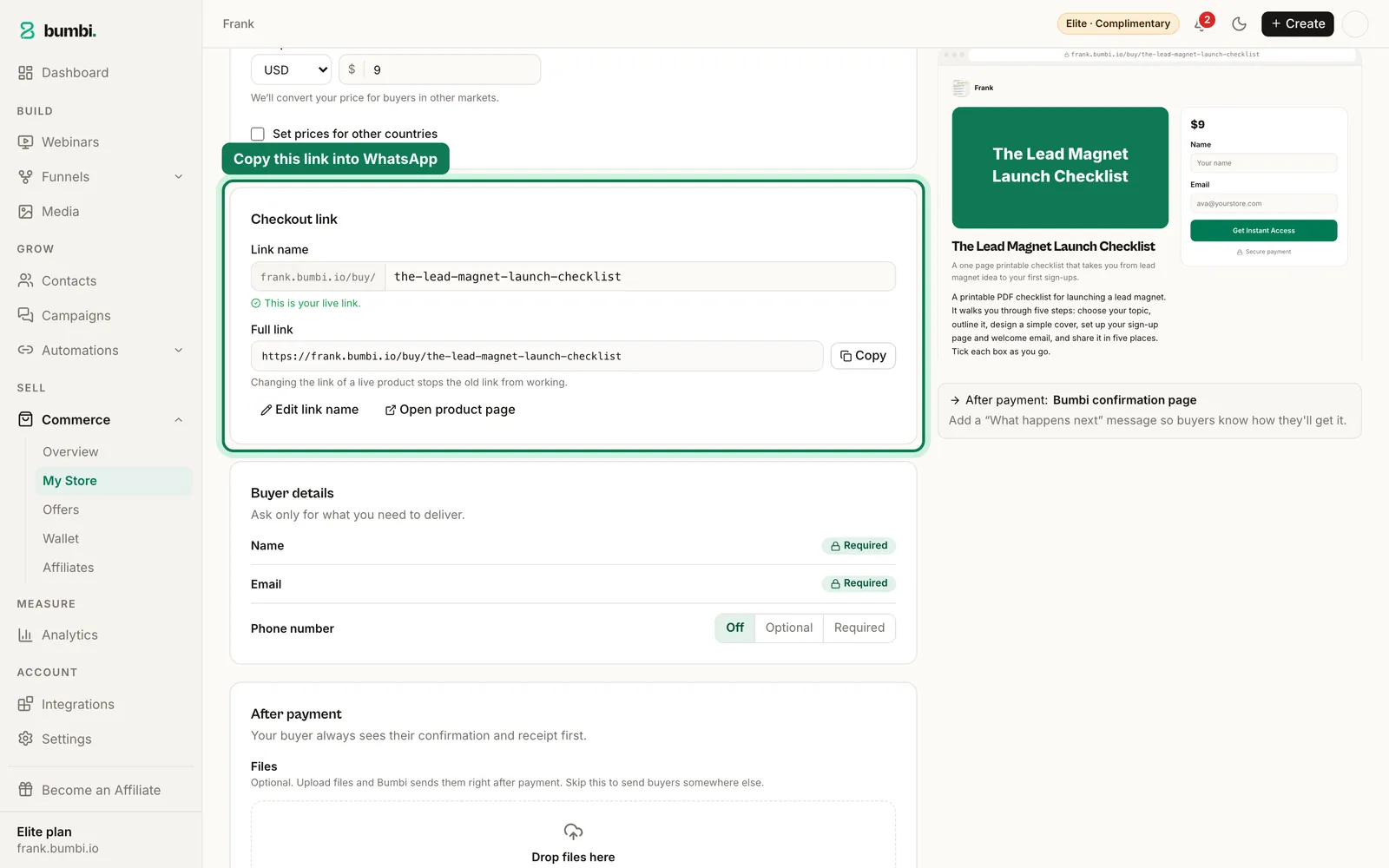
- Publish the product and copy its checkout link. Every product has its own link.
- Paste the link into WhatsApp. Send it in the chat, put it in your status, or pin it in your group description.
When the buyer pays, Bumbi delivers the product by email and keeps it in their library at bumbi.io/access, so they can download it again later. You do not send anything.
What to write with the link
A bare link gets ignored. A short message that answers the obvious questions gets paid. Try this shape:
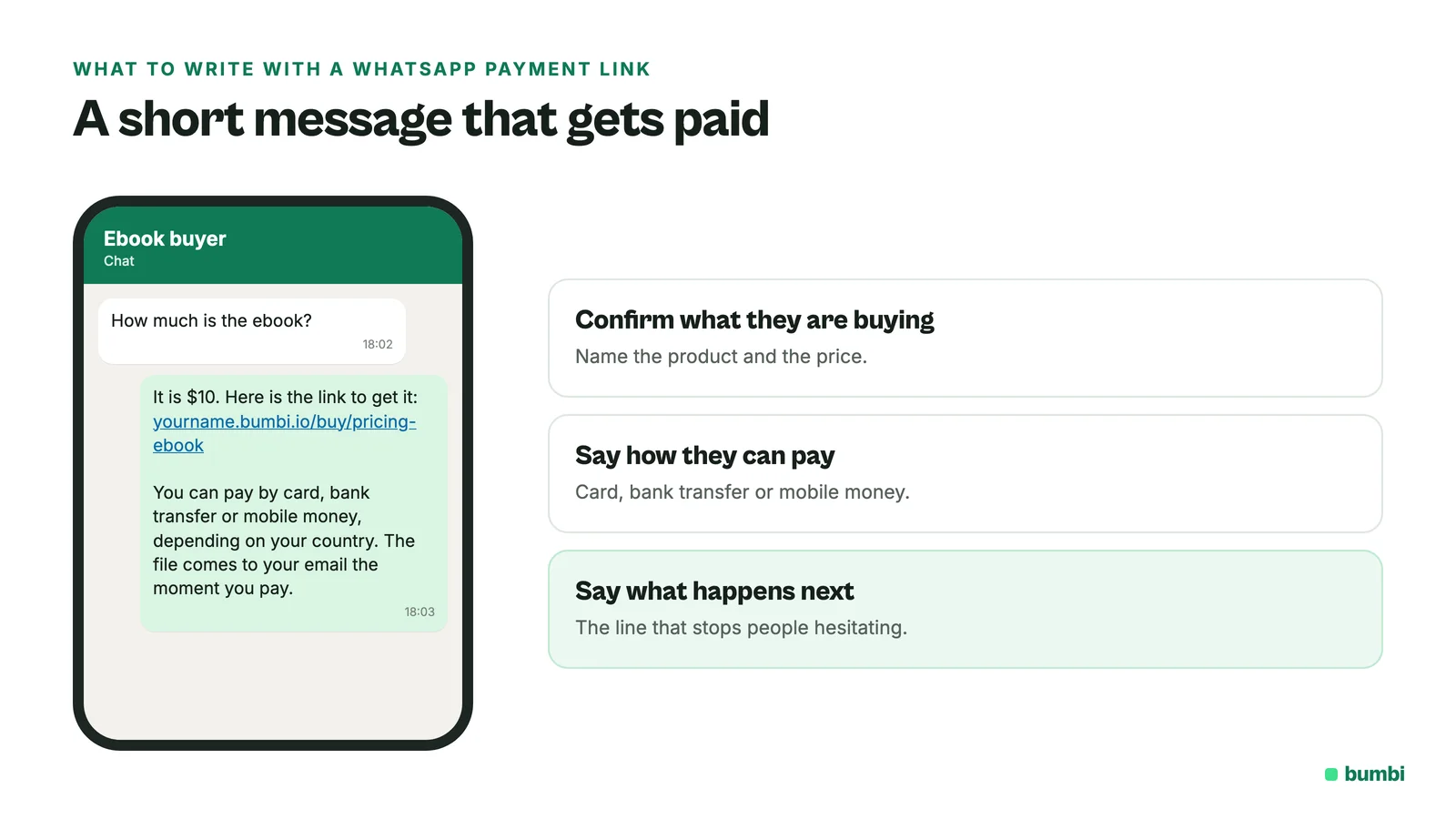
Here is the link for the Meal Prep Planner: [link]
You can pay by card or bank transfer, and the PDF comes to your email the moment you pay. Any questions, just reply here.
That message does three jobs. It confirms what they are buying, it tells them how they can pay, and it tells them what happens next. "The file comes to your email the moment you pay" is the line that stops people hesitating.
Two more habits help:
- Send the link once, not five times. If they go quiet, one friendly follow-up the next day is enough.
- Keep the price the same everywhere. If your status says one price and the checkout shows another, you lose trust fast.
Is it safe to pay through a WhatsApp link?
This is the question your buyers are asking themselves, and it is fair. Scammers send links on WhatsApp too. You can make yours easy to trust:
- Send links only to people who asked to buy, never as a cold message to strangers.
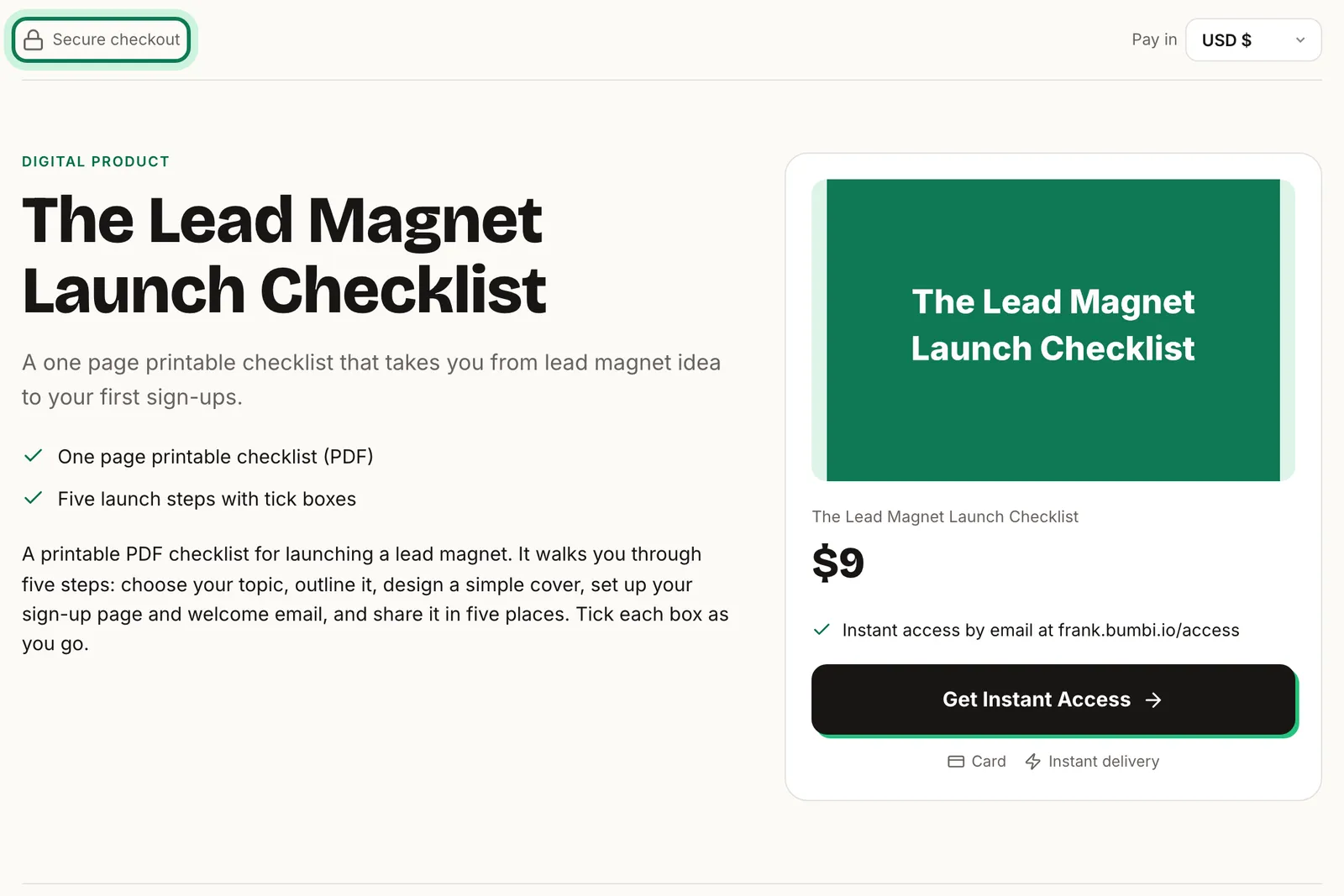
- Use a checkout that shows your name, the product and the price clearly before anyone pays.
- Put reviews from real buyers on your product page. Bumbi's reviews come from verified buyers.
- Tell buyers they will never be asked for a PIN or a one-time code by you in the chat.
When people tap the link but don't pay
It happens all the time. The bank app asks for a code, the network drops, someone calls them away. On Bumbi, if a buyer starts the checkout with their email and does not finish, Bumbi sends checkout reminders automatically, each with a link straight back to the payment. You can still send a personal "did something go wrong?" message on WhatsApp, which often works even better. People start checkout but don't pay covers this in detail.
Follow up on WhatsApp after the sale
The payment link closes the first sale. The next one comes from staying in touch. With Bumbi you can connect your own WhatsApp number and set up timed messages for people who joined your list with a WhatsApp consent box: a welcome note right away, a useful tip a few days later, then your next offer. Only people who ticked the box get them, and anyone who unsubscribes is never messaged again. See WhatsApp automation for how it works, and how to sell an ebook on WhatsApp with automatic delivery for a full example.
Mistakes that cost sales
- Sending account numbers to buyers in other countries. They usually cannot pay into them. Send a checkout link instead. How to sell digital products to buyers in other countries explains the currency side.
- Delivering by hand. If you are still emailing files yourself, you are the bottleneck, and buyers who pay at night wait until morning.
- One link for everything. Give each product its own link so the buyer lands on exactly what they asked for.
- No proof on the page. A first-time buyer from WhatsApp wants to see that others bought and were happy.
Want one place for all your links? Put every product on your storefront and share that when someone asks "what do you sell?". For single products, a payment link is all you need.
Stop sending account numbers. Create your first payment link on Bumbi and let the product deliver itself.
Frequently asked questions
- How do I create a WhatsApp payment link?
- Create your product on a checkout platform such as Bumbi, set the price, publish it and copy its checkout link. Paste that link into your WhatsApp chat, status or group. That is your WhatsApp payment link.
- How do I accept payments via WhatsApp?
- Send buyers a checkout link in the chat instead of your account details. They tap it, pay on the checkout page, and the payment is confirmed for you, so there are no screenshots to check.
- Are payments through WhatsApp links safe?
- They are as safe as the checkout the link opens. Send links only to people who asked to buy, use a checkout that clearly shows your name, product and price, and never ask buyers for a PIN or one-time code in the chat.
- Can buyers in other countries pay with my WhatsApp payment link?
- Yes, with Bumbi. Buyers in other countries see the price in their own currency where it is supported, and pay by card or a local method.
- How does the buyer get the product after paying?
- On Bumbi the product is delivered by email right after payment, and it stays in the buyer's library at bumbi.io/access so they can download it again.
- What is Bumbi?
- Bumbi is a platform for creators who sell digital products: ebooks, courses, templates and presets. Every product gets its own checkout link you can share on WhatsApp, with automatic delivery after payment.

Written by
Ava Milestone
Ava writes the Bumbi guides on selling digital products.
Start Doing More With Bumbi Funnels
Now you can simply build better pages, create better funnels and make more sales online
Related
Video Sales Letter: What a VSL Is, a Script and an Example
A video sales letter sells in the order you choose. Here is the 7 part script, a worked example and how to publish a VSL page that converts.
Bulk WhatsApp Messages: How to Send Safely to Your Own Buyers
What WhatsApp allows, why bulk senders get numbers blocked, and how sellers reach every buyer safely from their own number.
How to Build a Membership Website Without Code
What a membership site is, the types that work for creators, how to price it, and how to build one with renewals and access handled for you.