 Bumbi
Landing Page Builder Guide: How to Build a Sales Page That Converts
Pick the right landing page builder, then build your page in the order buyers decide. Templates, a visual builder or pasted HTML, with a checkout behind every button.
Quick answer: A landing page builder lets you create a page for one goal (a sale, a sign-up, a booking) without writing code. For selling digital products, pick a landing page builder that also handles the checkout and delivery, then build the page in this order: promise, problem, solution, what is inside, proof, offer, and a repeated buy button.
Most people looking for a landing page builder do not want a website. They want one page that does one thing: get the sale, get the email, get the booking. And they want it live today, not after a week of learning a tool.
This guide covers what to look for in a landing page builder, how to create a landing page for free, the structure of a sales page that converts, and how to build one in Bumbi with a template, the visual builder, or a page you made with an AI tool.
What is a landing page builder?
A landing page builder is a tool for making single, focused pages without a developer. You choose a template or start blank, drag in blocks like headlines, images, videos, forms and buttons, and publish the page to a web address.
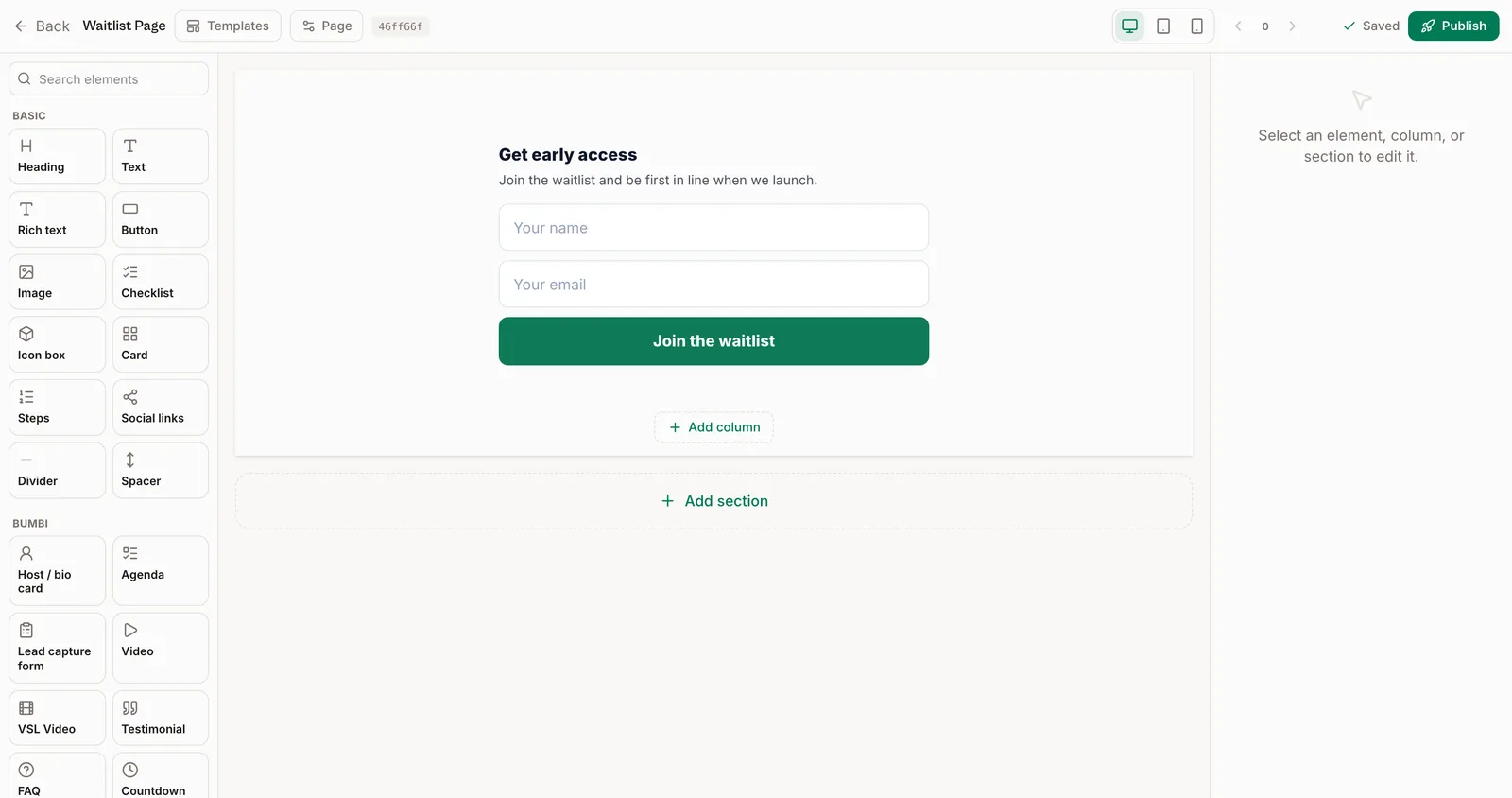
A landing page differs from a homepage in one way: it has one goal. No menu to wander off into, no five competing links. A sales page is a landing page whose goal is a purchase, which is why it usually runs longer.
Landing page vs sales page
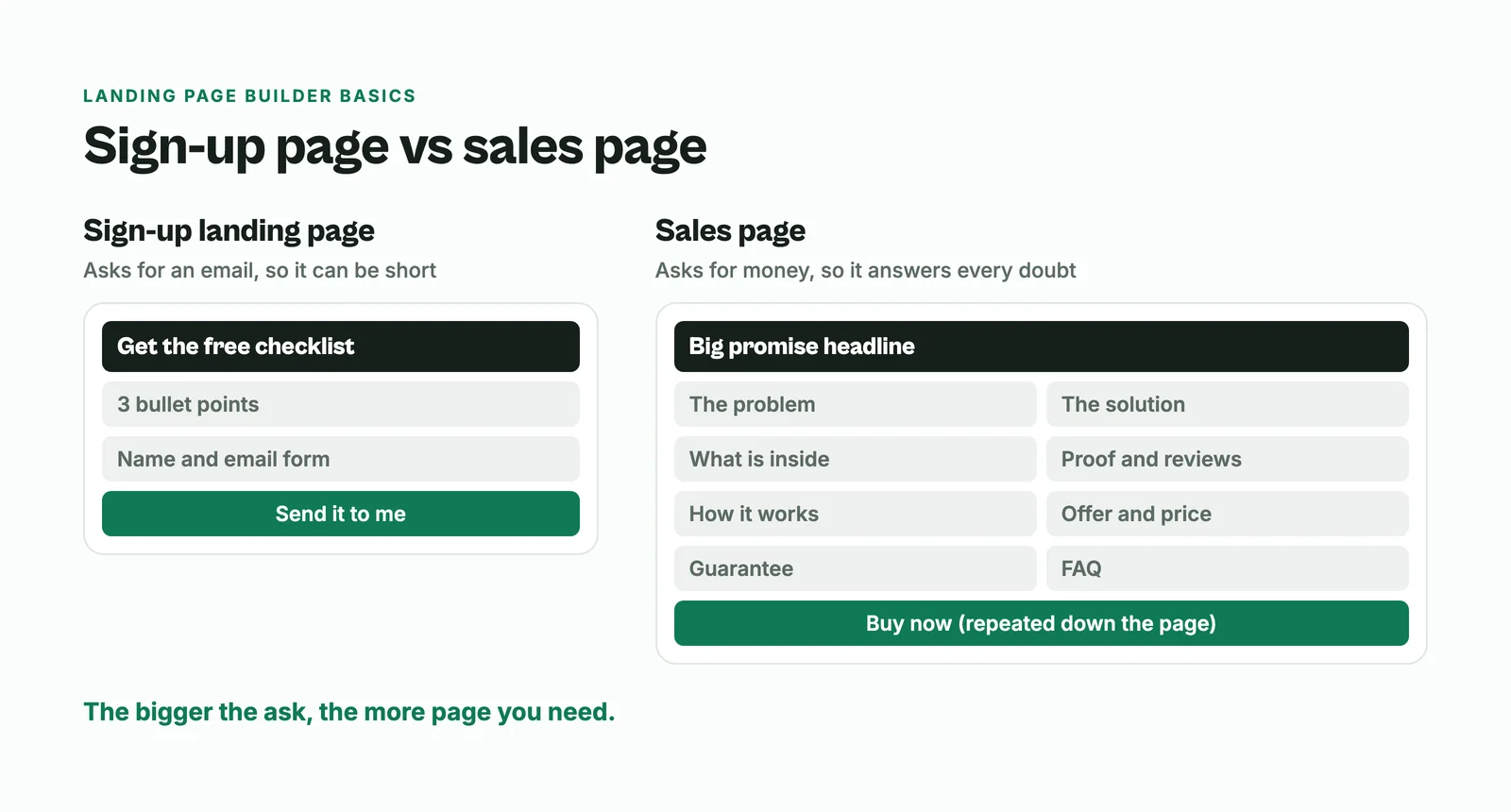
A sign-up landing page only needs an email, so it can be short: a headline, three bullet points and a form. A sales page asks for money, so it has to answer every reason someone might hesitate. The rule of thumb: the bigger the ask, the more page you need.
What to look for in a landing page creator
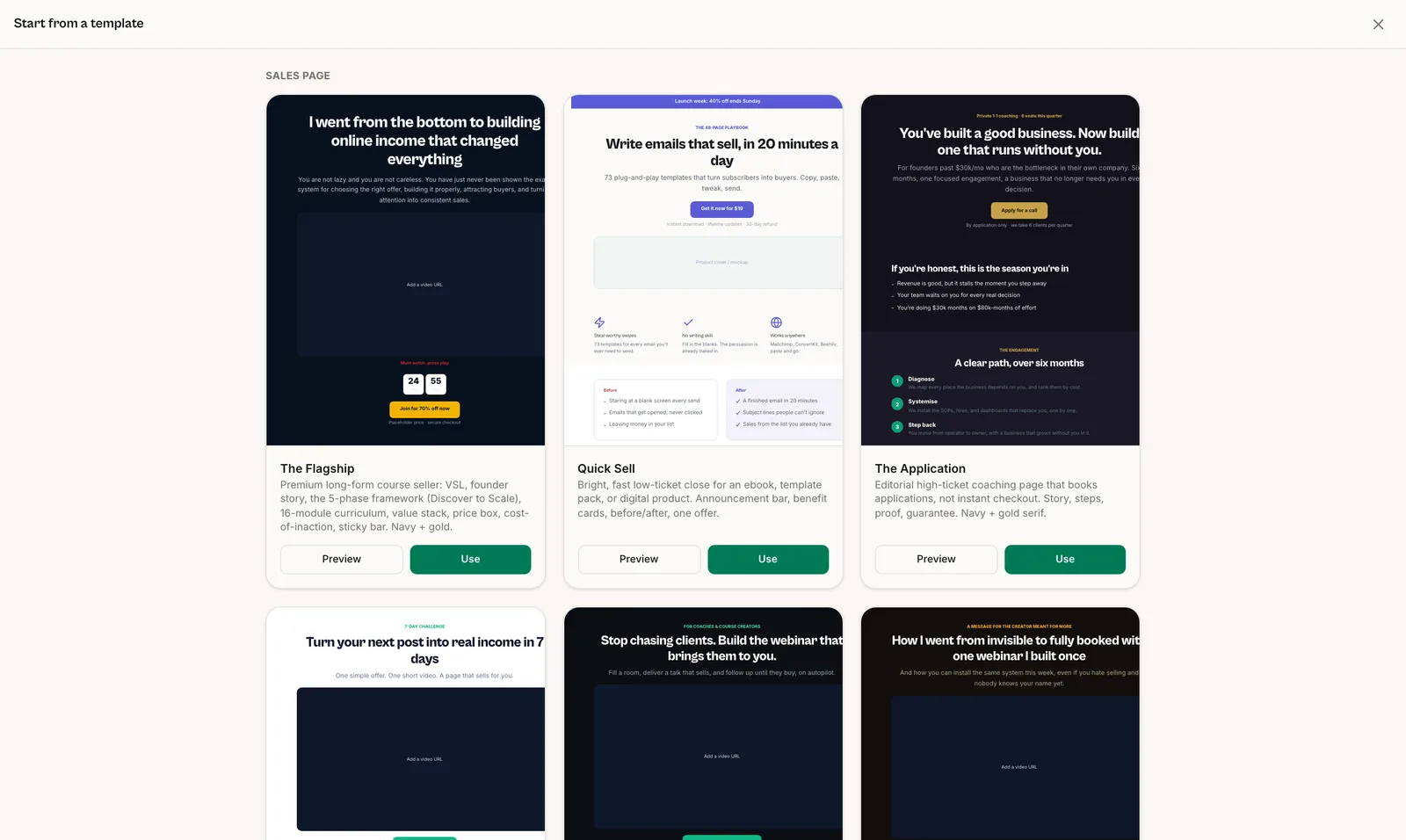
- Templates you can actually use. A good starting point that already follows a sales structure saves hours.
- No code editing. You should be able to change text, images and buttons by clicking on them.
- Mobile first. Most of your visitors arrive from Instagram, TikTok or WhatsApp on a phone. Check every page there.
- Forms that go somewhere. Sign-ups should land in your contact list, ready for follow-up.
- A real checkout. A beautiful page with a "Buy now" button that leads nowhere is the most common problem. If you sell products, the builder and the checkout should work together.
- Your own domain. yourname.com looks more trustworthy than a random address.
- Speed. Heavy pages lose impatient mobile visitors.
How to create a free landing page
Several builders have a free plan, including Bumbi. A free plan is usually enough to publish your first page on the builder's own address and start getting visitors. You typically pay for extras like a custom domain, more pages or more features. Before you commit, build one real page on the free plan and check it on your phone.
The structure of a landing page that sells
Great sales pages are not decorated, they are structured. Use this order:
- A big-promise headline. The result your buyer wants, stated specifically. "Plan a week of family meals in 20 minutes" beats "The Ultimate Meal Planner".
- A subheadline that adds who it is for or how it works.
- The problem. Show you understand their situation better than they can put it.
- The solution. Your product, introduced as the bridge from the problem to the result.
- What is inside. The concrete contents, written as benefits.
- Proof. Reviews, results, screenshots, your own story. Only real ones.
- How it works. Three simple steps so it feels doable.
- The offer and price. Value first, then the number.
- Risk reversal. A guarantee or a clear refund policy, if you offer one.
- FAQ. The real reasons people hesitate, answered in their words.
- The button, repeated. Several times down the page, not only at the bottom.
- Honest urgency. A real deadline or a real limit. Never a fake one.
How to write the copy
Write to one person, and use "you" far more than "we". Sell the result, not the feature list: people buy a better week, not 47 pages. Be specific, because specifics are believable and adjectives are not. Keep it easy to skim: short paragraphs, clear subheadings and bold lines, because most readers skim before they commit.
Do you need a long page?
Not always. If you sell through a webinar, the webinar does most of the selling, so you need a short registration page and a strong offer in the room. Here is how to write a webinar landing page. If the pitch works better on video, a video sales letter page with a short summary below can replace most of the text. A long written page earns its keep for colder traffic and for products people buy on their own, without a webinar.
A no code landing page builder for digital products: Bumbi
Bumbi is a platform for selling digital products, and its landing pages are built to sell those products. You have three ways to build a page:
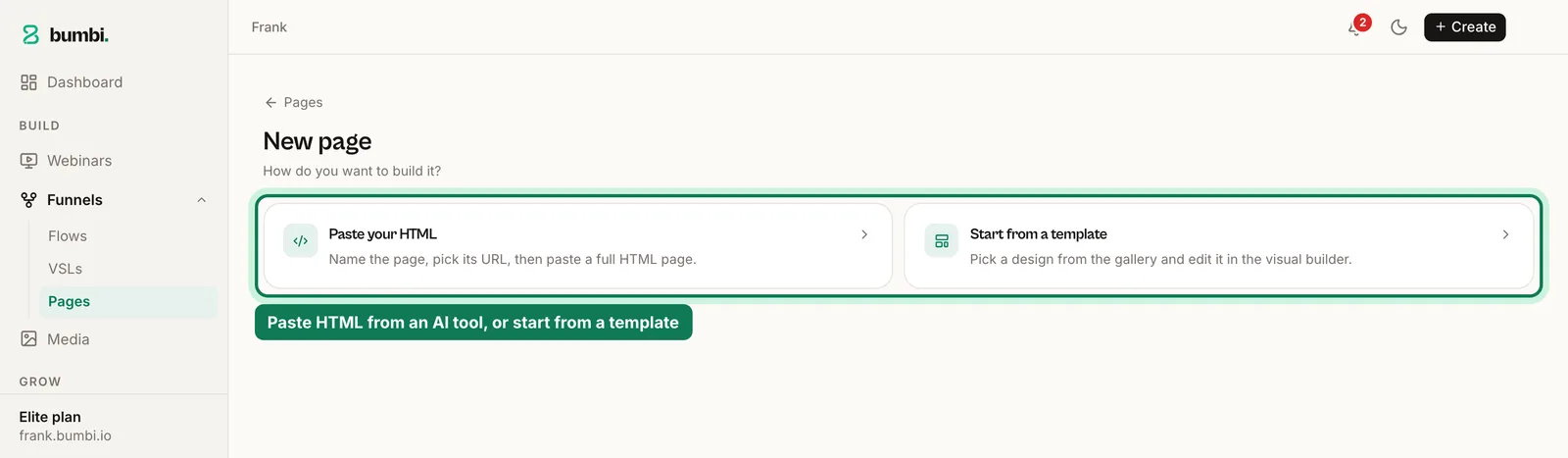
- Start from a template. Pick one, change the words and images, publish.
- Use the visual page builder. Click to edit, add blocks like headlines, videos, forms and buttons, and see exactly what visitors will see.
- Paste HTML. If you had ChatGPT or Claude write a page, paste the code and publish it. How to put a ChatGPT HTML page online walks through it.
Then connect the page to what you sell:
- Create your product and copy its checkout link.
- Point every button at that link. The buyer pays in their currency where supported and gets the product automatically.
- Add a form if the page is for sign-ups, so new contacts land in your list. A form can also collect a WhatsApp number with a consent box for WhatsApp follow-up.
- Connect your own domain on the Elite plan, or publish on your free Bumbi address on any plan.
- Preview on your phone, publish, and share.
Want to add more to each sale? An order bump on your checkout offers a small extra right before payment. See the landing pages feature page for more.
Mistakes that kill landing pages
- Leading with features. Open with the problem and the result.
- No proof. Without reviews or results, every claim is just your word.
- One buried button. Repeat it.
- Fake scarcity. Timers that restart for every visitor destroy trust once someone notices.
- A wall of text. If it cannot be skimmed, it will not be read.
- A slow, heavy page. Compress images and cut what does not help the sale.
- A button with nowhere to go. Test every button before you share the page.
Build the page and the checkout in one place. Start free on Bumbi and publish your first landing page today.
Frequently asked questions
- What is a landing page builder?
- A landing page builder is a tool for making single, focused pages without code. You start from a template or a blank page, add blocks like headlines, videos, forms and buttons, and publish.
- Can I create a landing page for free?
- Yes. Several builders have a free plan, including Bumbi, where you can publish a page on your free Bumbi address. Extras like your own domain usually come with paid plans.
- Can ChatGPT build a landing page?
- ChatGPT and Claude can write a complete page as one HTML file. You still need somewhere to put it online and a checkout behind the buttons. On Bumbi you paste the HTML into a landing page and publish it.
- What is the difference between a landing page and a sales page?
- A landing page has one goal, often a sign-up, so it can be short. A sales page is a landing page whose goal is a purchase, so it runs longer and answers more objections.
- Which landing page builder is best for selling digital products?
- One that works with your checkout and delivery, so every button leads to a payment and the product arrives automatically. Bumbi is a landing page builder and checkout in one.
- Can I use my own domain for my landing page?
- On Bumbi, custom domains are on the Elite plan. Every other plan publishes on your free Bumbi address.
- What is Bumbi?
- Bumbi is a platform for creators who sell digital products: ebooks, courses, templates and presets. Its landing pages come from templates, a visual builder or pasted HTML, with the checkout built in.

Written by
Ava Milestone
Ava writes the Bumbi guides on selling digital products.
Start Doing More With Bumbi Funnels
Now you can simply build better pages, create better funnels and make more sales online
How to Create a High-Converting Webinar Landing Page
NextHow to Receive International Payments for Digital Products
Comments
Comments are reviewed before they appear. Be kind.
Be the first to comment.
Related
Video Sales Letter: What a VSL Is, a Script and an Example
A video sales letter sells in the order you choose. Here is the 7 part script, a worked example and how to publish a VSL page that converts.
Bulk WhatsApp Messages: How to Send Safely to Your Own Buyers
What WhatsApp allows, why bulk senders get numbers blocked, and how sellers reach every buyer safely from their own number.
How to Build a Membership Website Without Code
What a membership site is, the types that work for creators, how to price it, and how to build one with renewals and access handled for you.