 Bumbi
Landing Page Generator AI: Publish a ChatGPT Page on Your Domain
Use AI as a free landing page generator, then publish the HTML on your own domain with a working checkout behind the button. Prompt included.
Quick answer: You can use ChatGPT or Claude as a free landing page generator: AI writes the whole page as one HTML file from a single prompt. To put it online, create a landing page in Bumbi, choose Paste your HTML, paste the code, swap the placeholder button for your checkout link, and click Publish. On the Elite plan you can then connect your own domain so the page lives at yourdomain.com.
No hosting account, no file upload tool, no code editor. The page you see in the chat window is the page your buyers see.
AI tools have become very good at writing a complete sales page. The trouble starts with the next step: where do you put it, how do you get it on your own domain, and what happens when someone clicks Buy? This guide covers the prompt that gets you a usable page, how to publish it, how to connect your domain, and what to check before you share it.
Landing page generator AI: using ChatGPT or Claude
Ask ChatGPT, Claude or Gemini for a landing page and you will get one of two things: a description of a page, or the actual code. You want the code, as a single HTML file with the styling inside it. That file is a complete web page. Once it is online, it looks exactly as it did in the AI's preview.
Why this beats many AI landing page builder tools for a creator: you keep full control of the words, you can ask for changes in plain English as many times as you like, and you can move the file anywhere. What the AI cannot do is host the page, take payment or deliver your product. That is the part you need a platform for.
The prompt that gets you a usable page
The one rule: ask for one file. Here is a prompt you can copy and adapt:
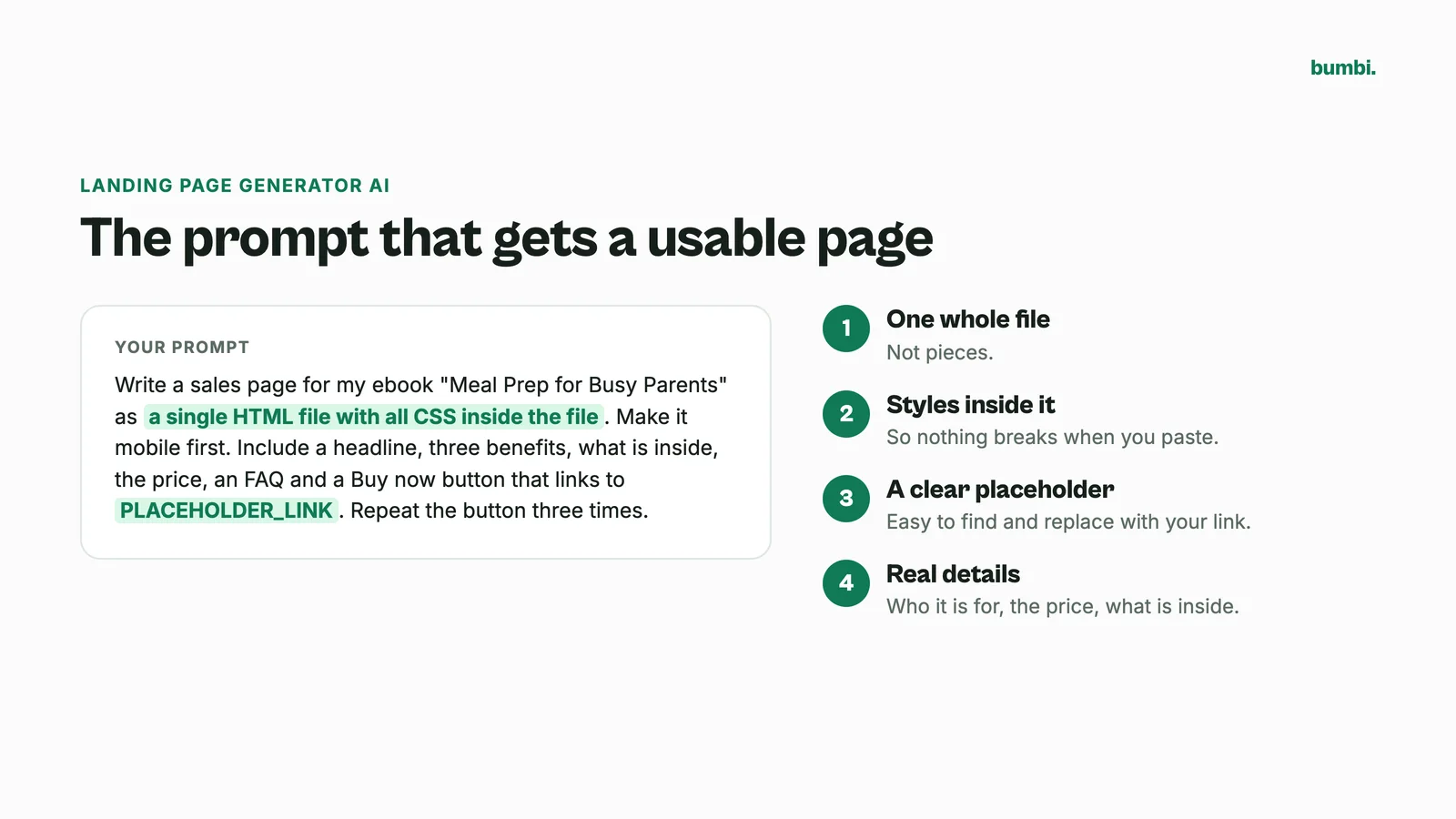
Write a sales page for my ebook "Meal Prep for Busy Parents" as a single HTML file with all CSS inside the file. Make it mobile first. Include a headline, a short problem section, three benefits, what is inside, a short about section, two testimonial placeholders, the price, an FAQ with four questions, and a Buy now button that links to PLACEHOLDER_LINK. Repeat the button three times down the page.
- Ask for the whole file, not pieces.
- Ask for styles inside the file, so nothing breaks when you paste it.
- Ask for a clear placeholder for the buy link, so you can find and replace it.
- Give it real details: who it is for, the price, what is inside. Vague prompts get vague pages.
Want help with what goes on the page? How to build a sales page has the structure that converts, and you can paste that structure into your prompt.
Step 1: Get your checkout link
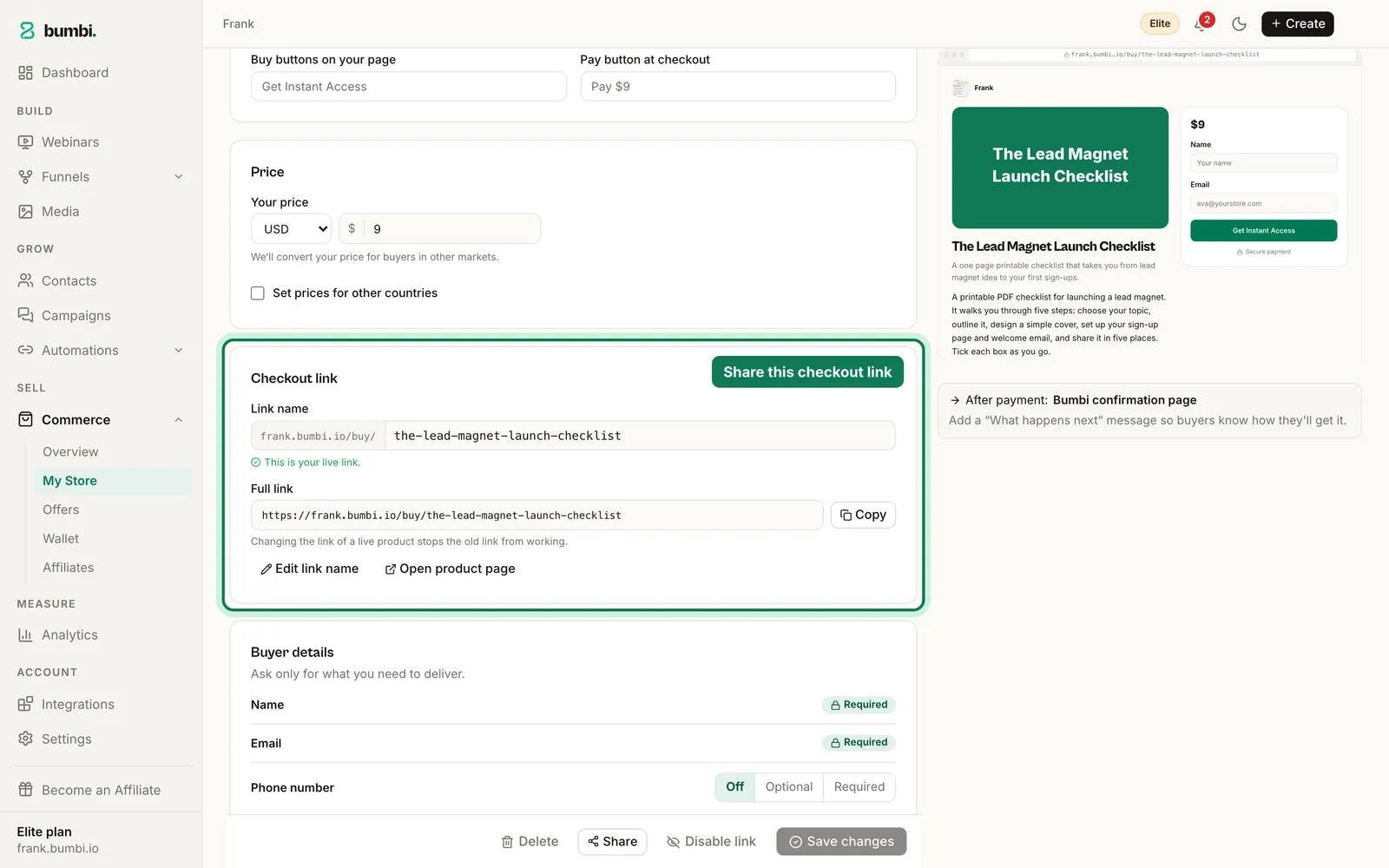
Before you paste anything, create the product you are selling. Open Commerce, then My Store, add the product, set the price and publish it. Click Share and copy the full checkout link. That link replaces PLACEHOLDER_LINK. When a buyer pays, Bumbi delivers the product automatically.
Step 2: Paste the HTML into Bumbi
- In the dashboard open Funnels, then Pages, and click New landing page.
- Choose Paste your HTML. Give the page a name and a URL slug, then click Create landing page.
- Paste the whole file into the Custom HTML box. Remove any lines of three backticks left over from the chat.
- Use find and replace (Ctrl+F or Cmd+F inside the box) to swap PLACEHOLDER_LINK for your checkout link. Check every button.
- Click Preview. Open it on your phone as well as your laptop.
- Add an SEO title and meta description. That is what Google shows.
- Click Publish.
Your page is live on your free Bumbi address right away.
Step 3: Connect your own domain
Custom domains are on the Elite plan; every other plan publishes on your free Bumbi address. Buy a plain domain from any registrar (a .com or your country's domain, whatever suits you) and keep the registrar's default DNS. Then:
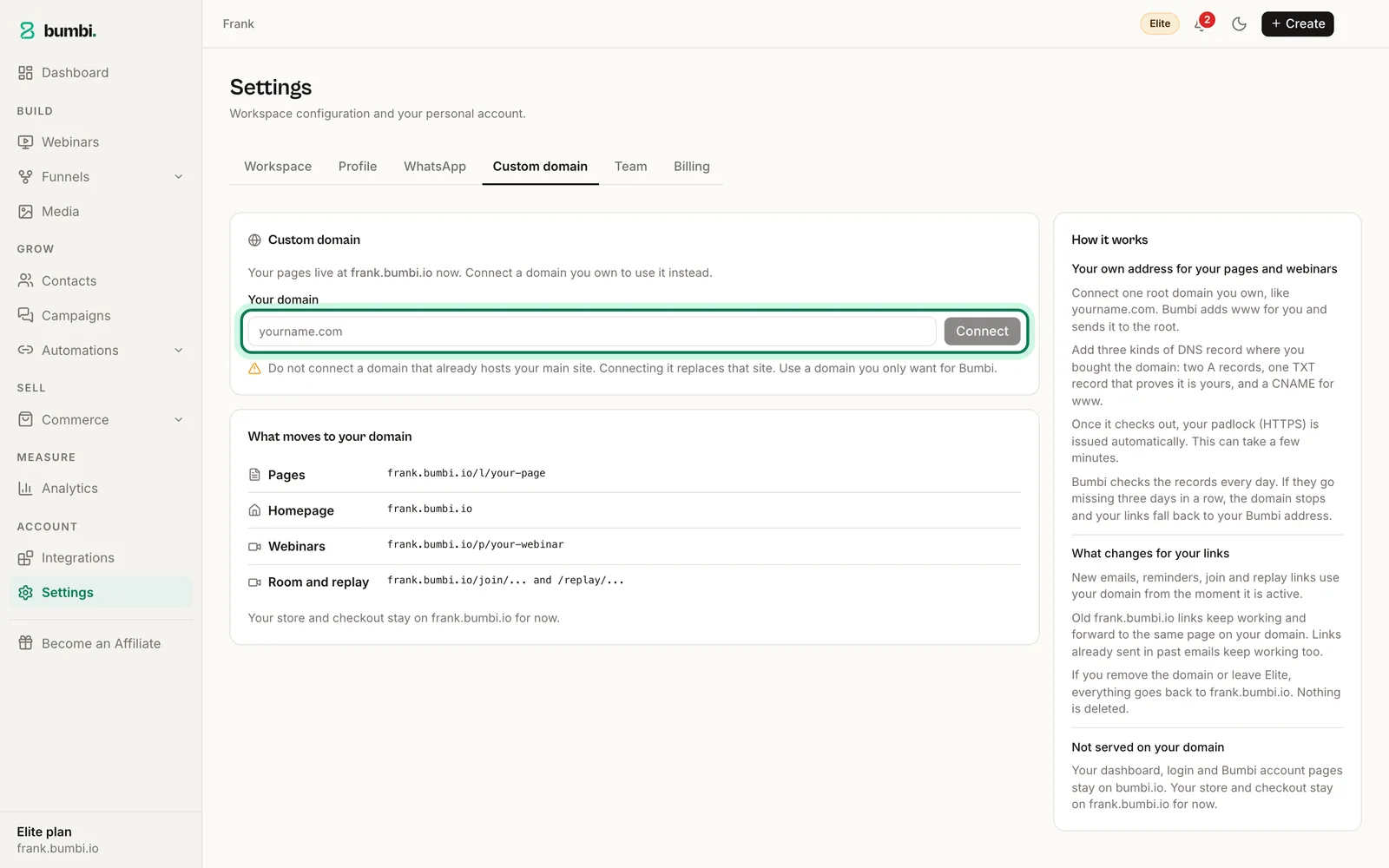
- In Bumbi open Settings, then Custom domain.
- Type your domain without www and click Connect.
- Bumbi shows a small table of DNS records: two A records for @, one TXT record that proves the domain is yours, and a CNAME for www.
- At your registrar, open the DNS settings and add each record exactly as shown. Remove any parked A record for @ first.
- Back in Bumbi, click Check my DNS.
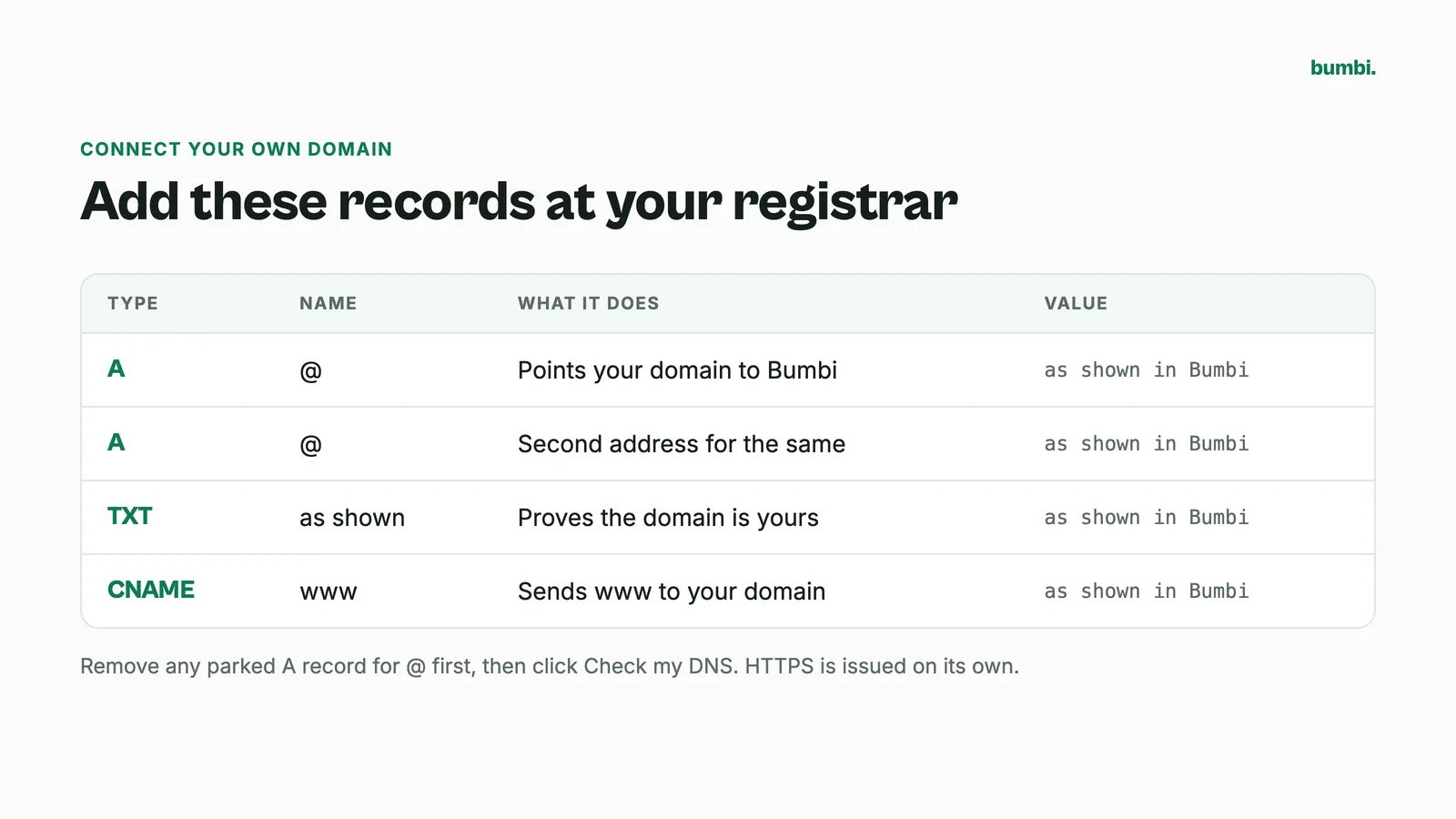
Ownership is usually confirmed within minutes, and the padlock (HTTPS) is issued on its own, normally within the hour. Use a domain that exists only for your Bumbi pages: Bumbi connects a root domain such as mybrand.com, and pointing your main website's domain at it would move the whole site.
What to check before you share the page
- Every button goes to the checkout link, not the placeholder.
- It reads well on a phone. Most buyers will open it from WhatsApp or Instagram.
- The price on the page matches the price on the checkout.
- Testimonial placeholders are replaced with real words from real buyers, or removed. Never publish invented reviews.
- Your Meta Pixel is added in Integrations, so you can measure and retarget visitors. Here is how Meta tracking works.
Can I edit the page later?
Yes. Ask the AI for the change, paste the new file, publish again. The address stays the same. Views and button clicks show in Analytics under Landing pages, so you can see whether the new version does better.
Prefer not to touch code?
Bumbi also has landing page templates and a visual page builder where you click to edit text, images, forms and buttons. You can use both: paste an AI page for one offer, build another visually. For a pitch that works better on video, try a video sales letter page instead.
Mistakes with AI generated landing pages
- Publishing the first draft. Read every line. AI invents details, like features your product does not have or statistics with no source. Delete anything that is not true.
- Fake testimonials. AI happily writes them. Do not publish them.
- Broken styling. If the page looks plain after pasting, the CSS was in a separate file. Ask for "all CSS inside the HTML file" and paste again.
- A Buy button with nowhere to go. Search the code for PLACEHOLDER before you publish.
Got an HTML page sitting in a chat window? Start free on Bumbi, paste it, and share the link today.
Frequently asked questions
- Can ChatGPT be a landing page generator?
- Yes. Ask ChatGPT or Claude for a sales page as a single HTML file with the CSS inside, and you get a complete page. A landing page generator AI writes the page; you still need a place to publish it and a checkout behind the button.
- Does the page keep the AI's styling?
- Yes, as long as the styles are inside the HTML file. Ask for inline or embedded CSS and paste the whole thing.
- Can I paste a page written by Claude, Gemini or another tool?
- Yes. It is plain HTML, so where it came from does not matter.
- Do I have to pay for hosting?
- No. Publishing a page is part of your Bumbi account, including the Free plan, on your free Bumbi address. Your own domain is on the Elite plan.
- Can I use a subdomain like shop.mybrand.com?
- No. Bumbi connects a root domain such as mybrand.com, and www comes with it. Buy a separate domain for your pages if your main domain already runs a website.
- Can I edit the page after publishing?
- Yes. Ask the AI for the change, paste the new file and publish again. The address stays the same.
- What is Bumbi?
- Bumbi is a platform for creators who sell digital products: ebooks, courses, templates and presets. You can paste an AI generated HTML page into Bumbi, link its buttons to your checkout and publish it.

Written by
Ava Milestone
Ava writes the Bumbi guides on selling digital products.
Start Doing More With Bumbi Funnels
Now you can simply build better pages, create better funnels and make more sales online
Related
Video Sales Letter: What a VSL Is, a Script and an Example
A video sales letter sells in the order you choose. Here is the 7 part script, a worked example and how to publish a VSL page that converts.
Bulk WhatsApp Messages: How to Send Safely to Your Own Buyers
What WhatsApp allows, why bulk senders get numbers blocked, and how sellers reach every buyer safely from their own number.
How to Build a Membership Website Without Code
What a membership site is, the types that work for creators, how to price it, and how to build one with renewals and access handled for you.