 Bumbi
Meta Conversions API: What It Is and How to Set It Up
Ads Manager shows fewer sales than your dashboard? Here is what the Meta Conversions API does, how it works with the Pixel, and how to set it up without code.
Quick answer: The Meta Conversions API (often called Facebook CAPI) sends events like purchases and sign-ups from a server straight to Meta, instead of relying only on the Meta Pixel in the visitor's browser. Meta recommends running both together, matched by a shared event ID so each event is counted once. For creators, the easiest route is a platform that sends these events for you, so you never touch code.
You run an ad, people buy, and Ads Manager shows fewer sales than your dashboard. That gap is a tracking problem, and it makes Meta's algorithm worse at finding your next buyer, because it learns from the conversions it can see.
This guide explains what the Conversions API is, how it differs from the Meta Pixel, how deduplication works, the ways to set it up, and what to do if you sell digital products and do not want to write code.
What is the Meta Conversions API?
The Meta Conversions API is a way to send marketing events to Meta from your server (or your platform's server) rather than from the visitor's browser. Meta describes it as a connection between an advertiser's marketing data and Meta's systems, used to improve ad targeting and measure results. Events sent this way are processed like events sent by the Meta Pixel, so they show up in reporting and help with optimization in the same way.
In plain words: when someone buys, the system that took the payment tells Meta directly, "this purchase happened".
Meta Pixel vs Conversions API: what is the difference?
| Meta Pixel | Conversions API | |
|---|---|---|
| Where it runs | In the visitor's browser | On a server |
| How it is added | A code snippet on your pages | A server connection, a partner integration, or setup in Events Manager |
| What can stop it | Ad blockers, browser privacy settings, the visitor closing the page early | Much less dependent on the browser |
| Best for | Page views and on-page actions | Events your system knows for sure, like a confirmed payment |
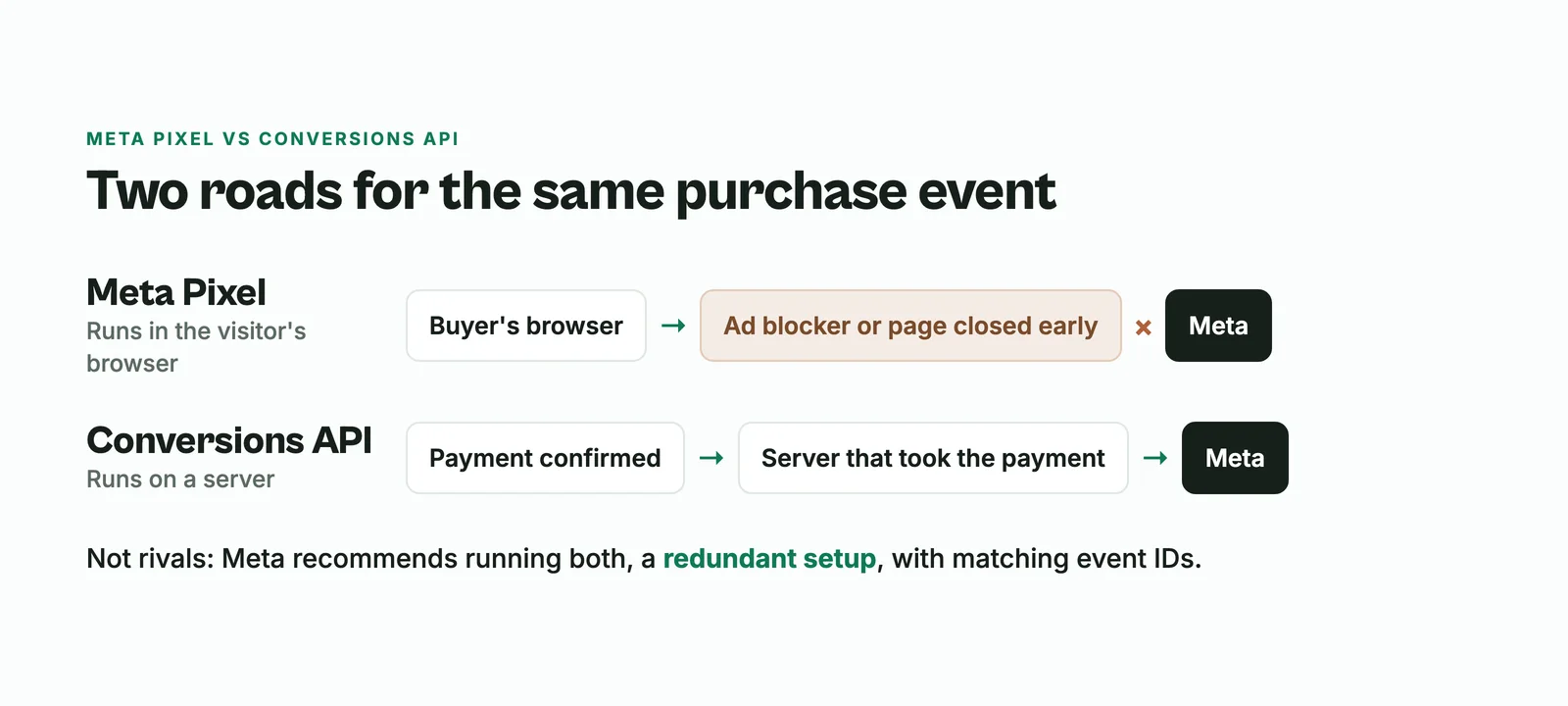
They are not rivals. Meta recommends running the Conversions API alongside the Pixel, and calls that a redundant setup.
How deduplication works
If the Pixel and the Conversions API both report the same purchase, you do not want it counted twice. Meta handles this by matching two fields:
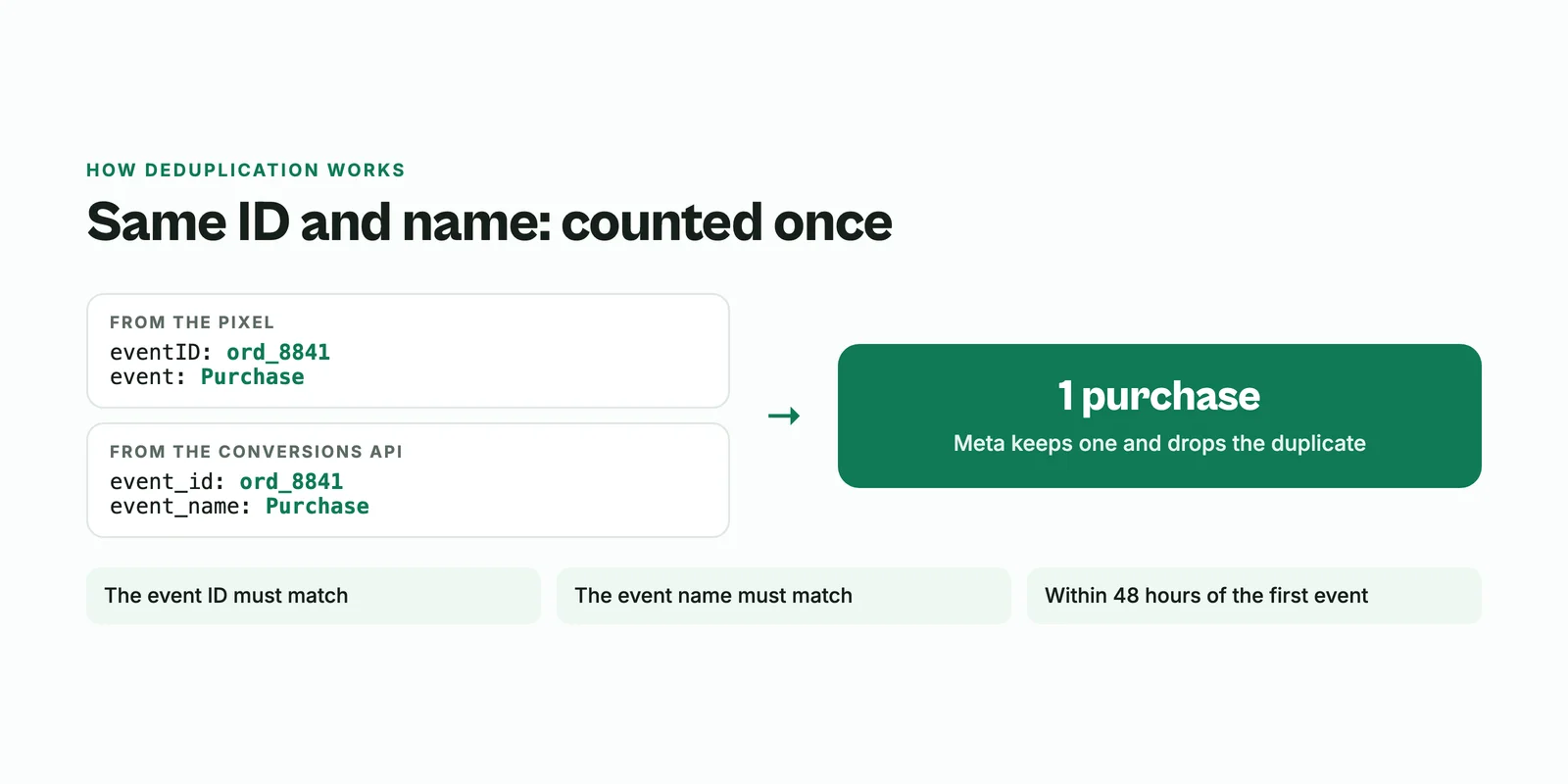
- The event ID: the Pixel's eventID must match the Conversions API's event_id.
- The event name: for example, both must say Purchase.
Meta only deduplicates events received within 48 hours of the first event with that ID. If your setup sends matching IDs, you get the reliability of two sources without double counting.
How to set up the Conversions API in Meta
There are three common routes:
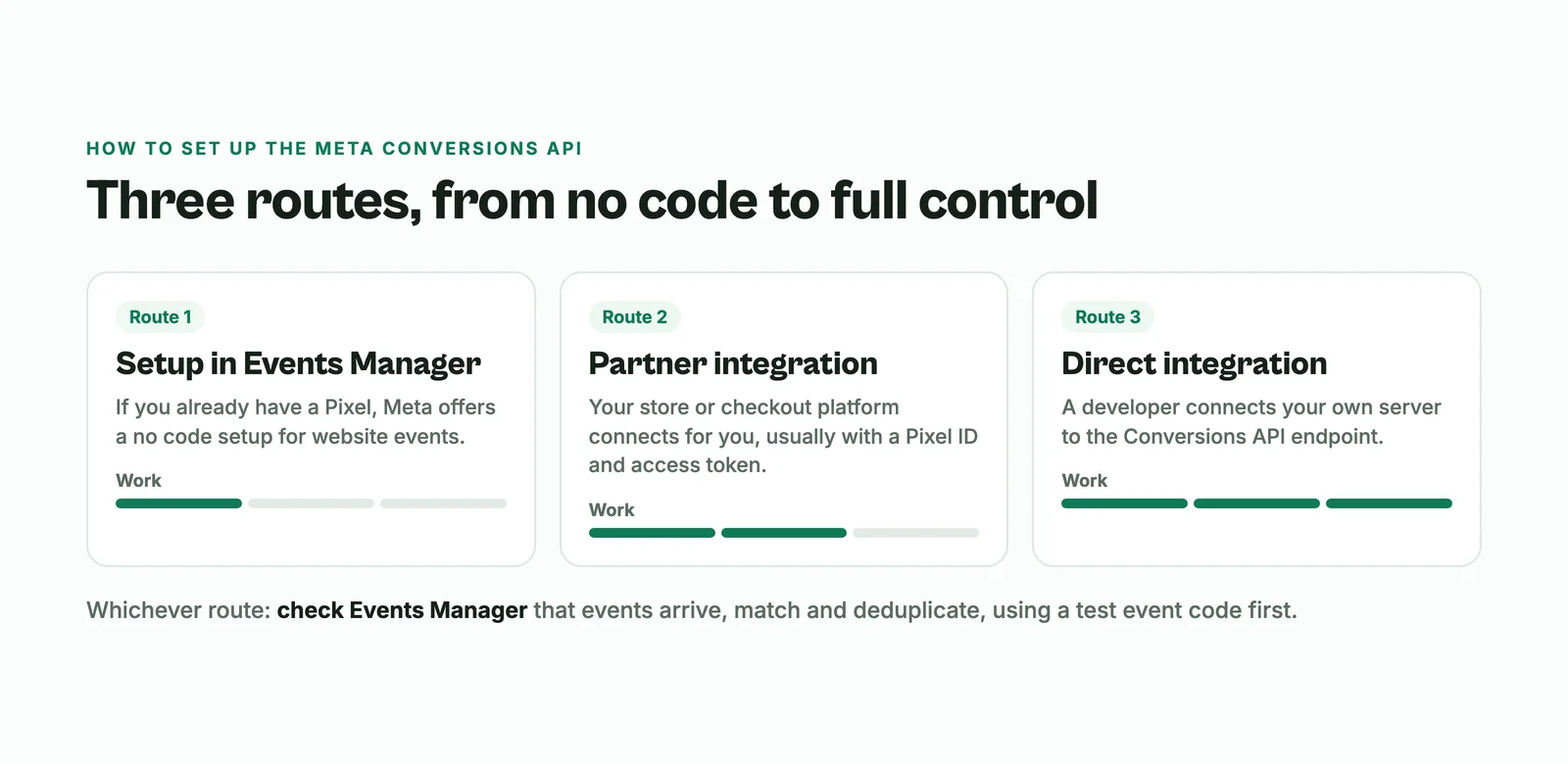
- One-click setup in Events Manager. If you already have a Meta Pixel, Meta offers a Conversions API setup for website events from Events Manager, which it says needs no code and has no setup fees.
- A partner integration. Many store, checkout and website platforms connect to the Conversions API for you. You usually paste your Pixel ID and an access token from Events Manager.
- A direct integration. A developer connects your own server to Meta's Conversions API endpoint. Most flexible, most work.
Whichever route you choose, check Events Manager afterwards. Meta's own guidance is to confirm that events arrive, are matched, and are deduplicated correctly. A test event code lets you see test events without polluting your real data.
Is the Conversions API free?
Meta's one-click setup in Events Manager comes with no setup fees, according to Meta. You may pay for other parts: a developer for a direct integration, server hosting, or a partner tool. If the platform you sell on already includes it, there is nothing extra to set up.
Is the Conversions API worth it?
If you run Meta ads, usually yes. The ad system optimizes for the people it sees converting. When purchases go missing, it learns from less data, and your reported cost per sale looks worse than it really is. A setup that reports confirmed purchases reliably gives the algorithm, and you, a truer picture.
If you do not run ads yet, the Pixel alone is enough to start building audiences for later.
Meta tracking for creators who sell digital products
Bumbi is a platform for creators who sell digital products, and it handles the Meta Pixel for you without code:
- Copy your Pixel ID from Meta Events Manager. It is a 15 to 16 digit number.
- Open Integrations in Bumbi, paste it into Meta Pixel, and switch it on.
- That is it. The Pixel loads on your public Bumbi pages.
Bumbi then fires standard events as people move through your funnel: Lead and CompleteRegistration when someone signs up, ViewContent, and InitiateCheckout when they open a checkout. On webinars it also sends custom events such as WebinarStarted, Watched25, Watched50, Watched75, WatchedCompleted, OfferClicked and ReplayWatched, so you can build audiences of people who watched most of your session but did not buy. Each event gets one event ID that is reused across platforms. Integrations availability depends on your plan; see pricing.
Tracking only helps if the funnel behind it converts. Pair your ads with a page that sells (how to build a sales page), a webinar or a video sales letter, and let checkout reminders catch the buyers who stop at the last step.
Common Conversions API mistakes
- Sending events twice without matching IDs. Your purchases get double counted and your results look better than they are.
- Different event names. "Purchase" from the Pixel and "purchase_complete" from the server will not deduplicate.
- Never testing. Use the test event tool before you trust the numbers.
- Putting the access token in public code. The token belongs on a server or inside your platform's settings, never in a page anyone can view.
- Tracking everything. Start with the events that matter (sign-up, checkout started, purchase), then add more.
Get your Meta Pixel running in minutes, no code. Start selling on Bumbi and connect your Pixel ID in Integrations.
Frequently asked questions
- What is the Meta Conversions API?
- The Meta Conversions API sends marketing events such as purchases and sign-ups from a server to Meta, instead of only from the visitor's browser through the Meta Pixel. Meta processes these events like Pixel events for reporting and ad optimization.
- What is the difference between the Meta Pixel and the Conversions API?
- The Pixel runs in the visitor's browser and can be stopped by ad blockers or privacy settings. The Conversions API runs on a server. Meta recommends using both together.
- How do I avoid counting events twice?
- Send the same event name and a matching event ID from the Pixel (eventID) and the Conversions API (event_id). Meta deduplicates matching events received within 48 hours.
- How do I set up the Conversions API in Meta?
- Use the one-click setup in Events Manager if you have a Pixel, a partner platform that connects for you, or a direct integration built by a developer. Then check Events Manager with a test event.
- Is the Conversions API free?
- Meta says its one-click setup in Events Manager has no setup fees. A developer, server hosting or a partner tool may cost money.
- Do I need code to add the Meta Pixel to Bumbi?
- No. Paste your Pixel ID in Bumbi's Integrations and switch it on. Bumbi fires sign-up, checkout and webinar events on your pages for you.
- What is Bumbi?
- Bumbi is a platform for creators who sell digital products: ebooks, courses, templates and presets. It adds your Meta Pixel to your pages without code and fires funnel events such as Lead and InitiateCheckout.

Written by
Ava Milestone
Ava writes the Bumbi guides on selling digital products.
Start Doing More With Bumbi Funnels
Now you can simply build better pages, create better funnels and make more sales online
Related
Video Sales Letter: What a VSL Is, a Script and an Example
A video sales letter sells in the order you choose. Here is the 7 part script, a worked example and how to publish a VSL page that converts.
Bulk WhatsApp Messages: How to Send Safely to Your Own Buyers
What WhatsApp allows, why bulk senders get numbers blocked, and how sellers reach every buyer safely from their own number.

How to Build a Membership Website Without Code
What a membership site is, the types that work for creators, how to price it, and how to build one with renewals and access handled for you.