 Bumbi
How to Create an Ebook to Sell: From Outline to First Sale
Write, design and export a short ebook people will pay for, then put it on sale with automatic delivery.
Quick answer: Here is how to create an ebook to sell: pick one problem your readers have, outline 5 to 8 chapters that solve it, write it in plain language with your own examples, design it in a tool you already use, export a PDF, and put it behind a checkout link that delivers it automatically. A focused 25 to 40 page ebook is enough.
Most people picture an ebook as a book: 200 pages, a year of writing, a publisher's blessing. The ebooks that make creators money look nothing like that. They are short, practical, and written by someone who has done the thing they are teaching.
This guide covers the writing, the design, the tools and the selling, so you finish with a file people can buy, not a draft in a folder.
Step 1: Choose a topic that solves one problem
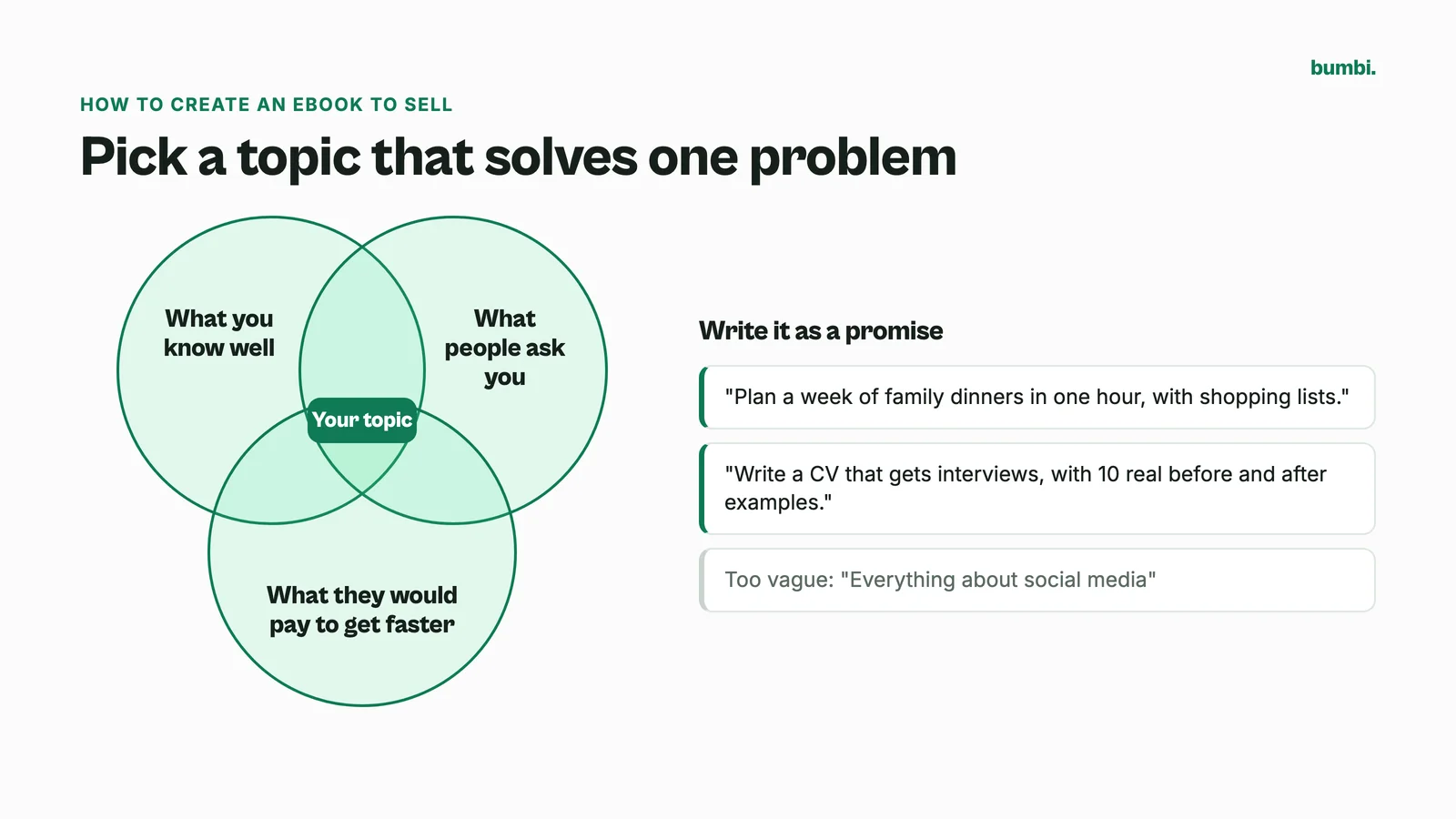
The best topic is the intersection of three things: what you know well, what people ask you about, and what they would pay to get faster. Write it as a promise:
- "Get your first 100 Instagram followers for your small bakery in 30 days."
- "Plan a week of family dinners in one hour, with shopping lists."
- "Write a CV that gets interviews, with 10 real before and after examples."
If the promise is clear, the chapters almost write themselves. If it is vague ("everything about social media"), you will struggle to finish and struggle to sell.
Step 2: Outline before you write
Open a blank page and write:
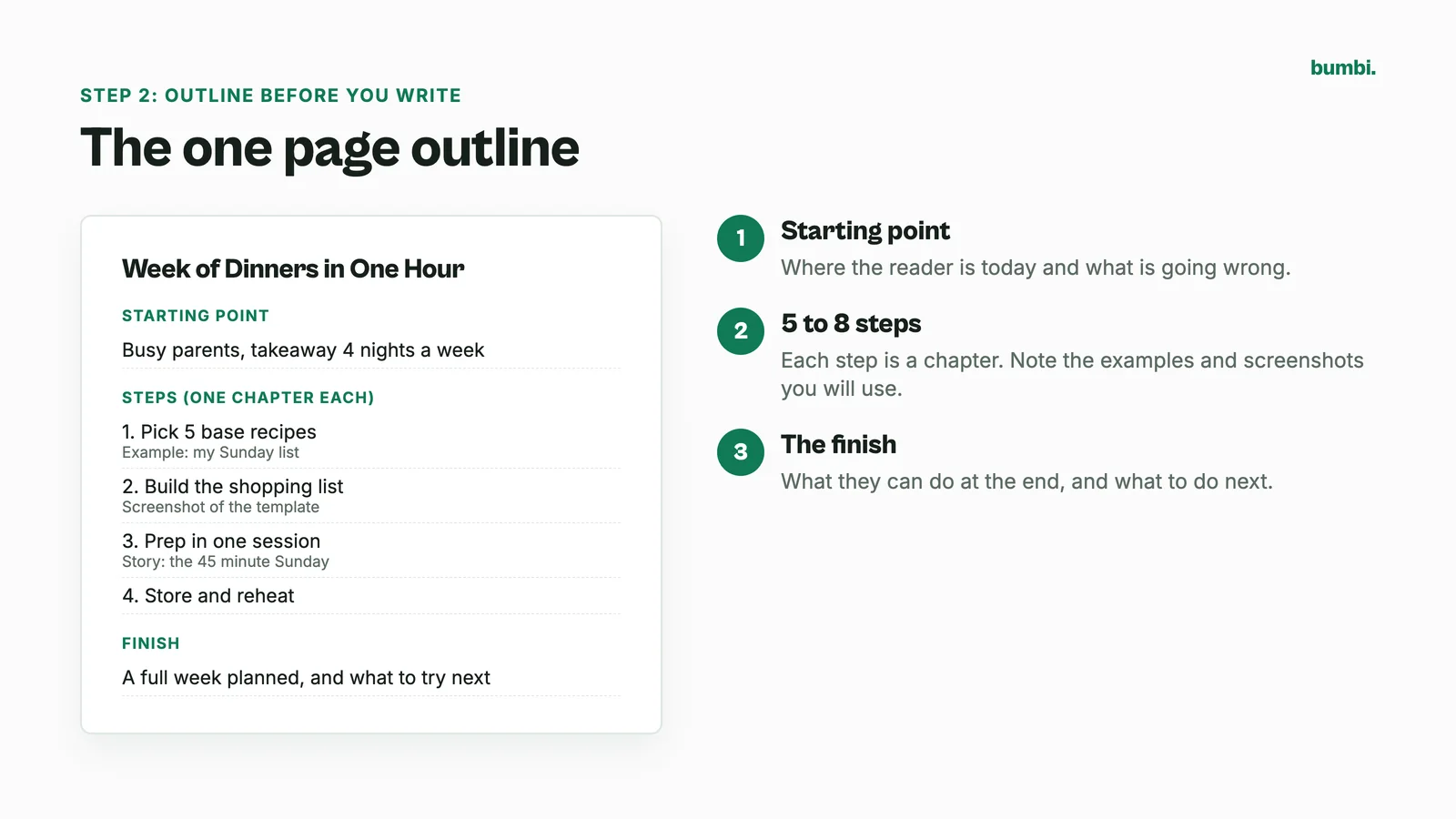
- The starting point: where your reader is today and what is going wrong.
- The steps: 5 to 8 actions that take them to the result. Each step is a chapter.
- The finish: what they can do at the end, and what they should do next.
Under each chapter, list the examples, screenshots or stories you will use. This one page outline is the most important thing you will write.
Step 3: Write it (and write it like you talk)
- Write one chapter per session. 30 to 60 minutes, no editing while you write.
- Use "you". Talk to one reader, the way you would explain it over a coffee.
- Use real examples. Your client's results, your own mistakes, a screenshot of the actual setting. That is what readers cannot get from a free blog post.
- Add action at the end of each chapter: a checklist, a short exercise, or a "do this today" line.
Can AI help? Yes, for brainstorming chapter titles, tightening a messy paragraph, or turning your notes into a checklist. Do not let it write the whole book. Readers can tell, and your reviews will show it.
Step 4: Design the ebook
You do not need to be a designer. You need it to be readable on a phone.
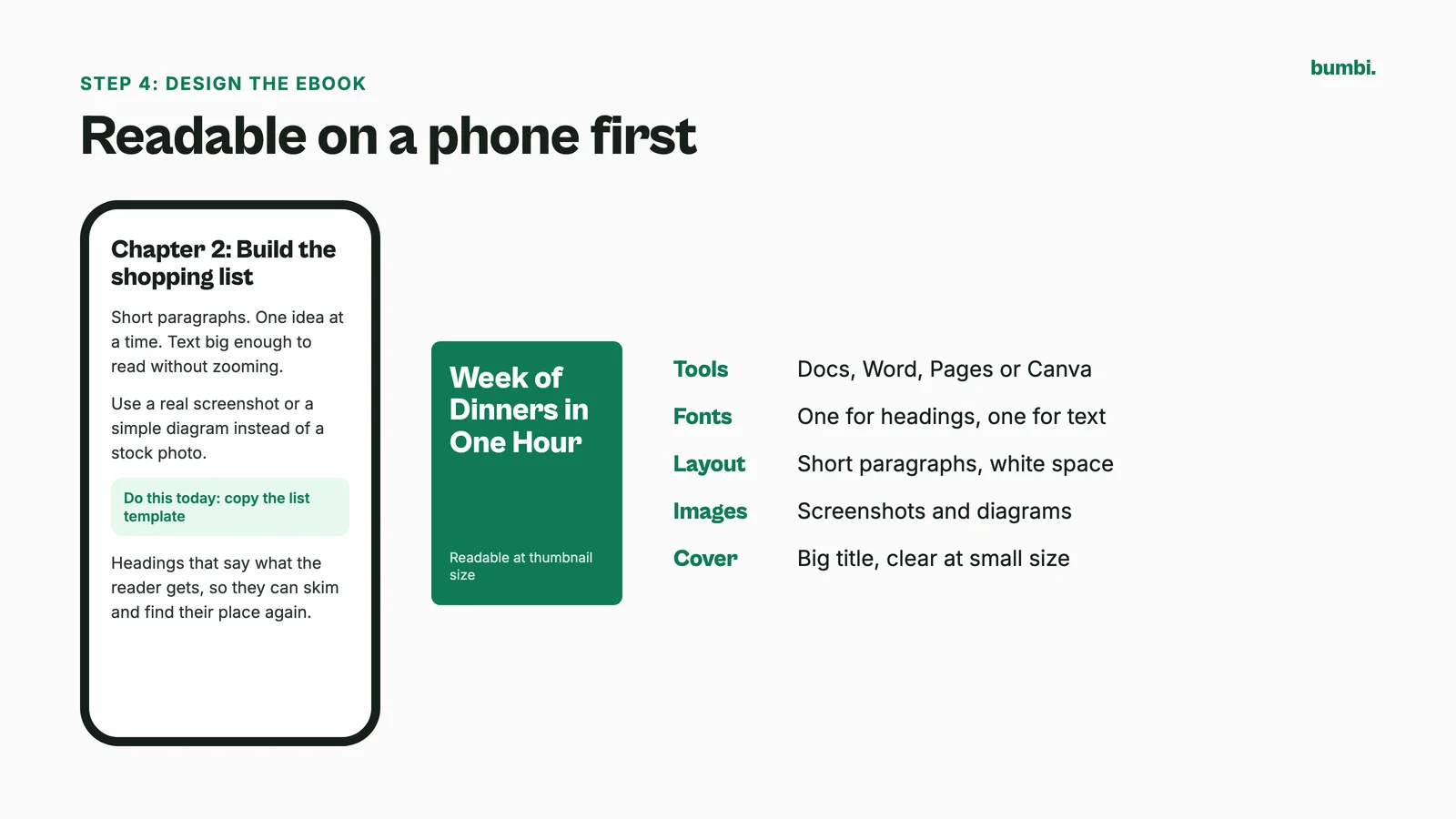
- Tools: Google Docs, Microsoft Word, Apple Pages or Canva all work. Use whichever you already know.
- Fonts: one font for headings, one for text. Body text large enough to read on a phone without zooming.
- Layout: short paragraphs, clear headings, plenty of white space, and one idea per page where you can.
- Images: screenshots and simple diagrams beat stock photos.
- Cover: the title big and readable at thumbnail size, because that is how most buyers first see it.
Step 5: Export and test
Export as a PDF. Every common writing and design tool can save or download a PDF. Then:
- Open it on your phone and on a computer.
- Check that links inside the book work.
- Keep the file reasonably small so it downloads quickly on mobile data.
- Ask one person from your audience to read it and tell you where they got stuck.
Step 6: Write the page that sells it
Buyers decide in seconds, usually on a phone. Your product page needs five things, in this order:
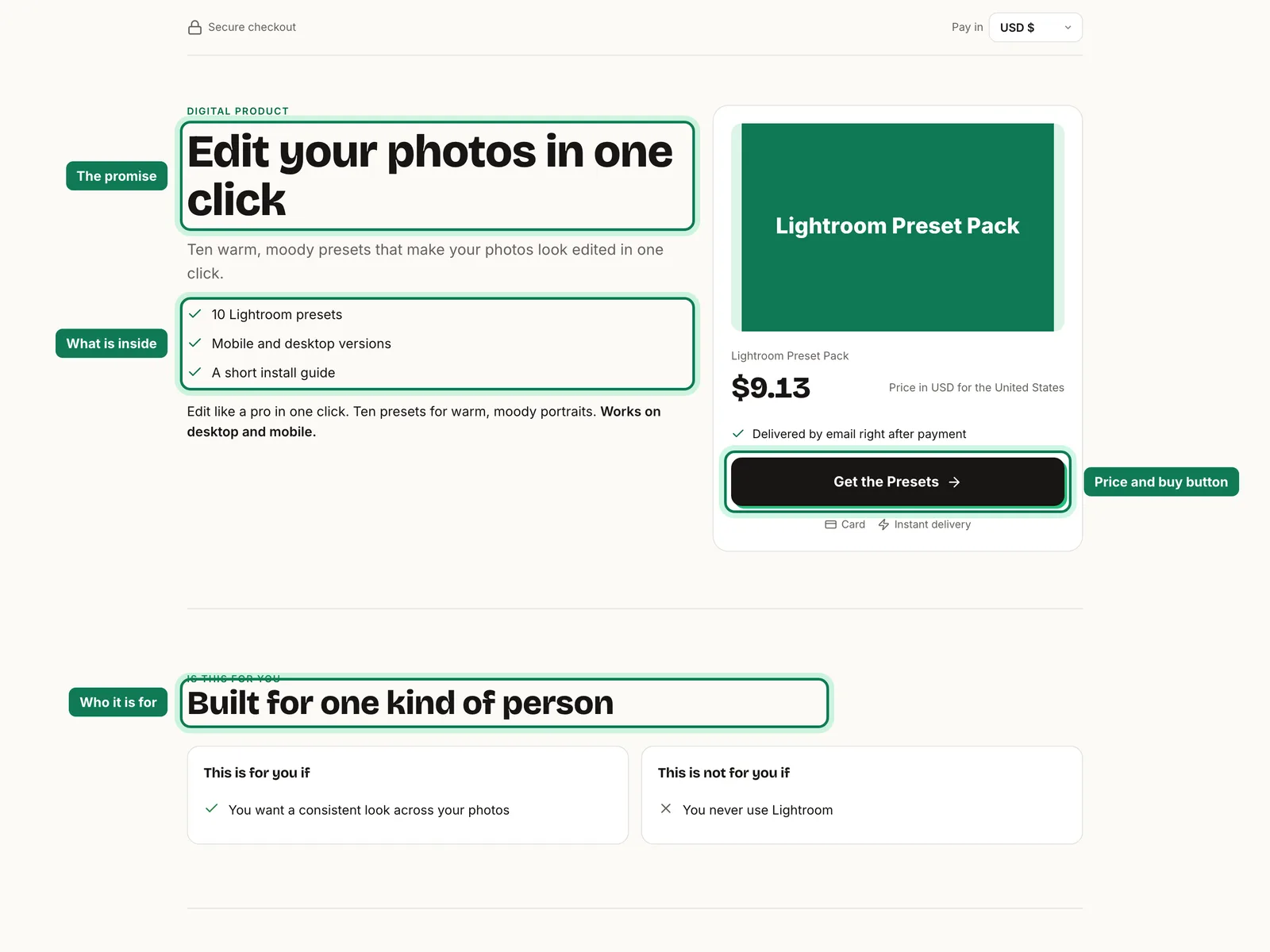
- The promise in one line, the same one you wrote in step 1.
- Who it is for and who it is not for. Being honest here cuts refunds.
- What is inside: the chapter list, the number of pages, any checklists or templates included.
- Proof: two preview pages, a short note on why you are the person to write it, and reviews once you have them.
- The price and the buy button, visible without scrolling through an essay.
That is enough to start. When the ebook is selling, you can add a longer page with a video. Our guide on building a sales page shows how.
How to make and sell an ebook: the selling part
A finished PDF is not a business yet. To turn it into one, you need a sales page, a checkout, delivery and follow up. Bumbi handles all four.
- Add the ebook as a product. Write who it is for, what is inside, and add the cover plus two preview pages.
- Upload the PDF (or EPUB), up to 20 MB. Bumbi delivers it the moment someone pays and keeps it in their library at bumbi.io/access.
- Set your price once. Buyers in other countries see and pay in their own currency where supported.
- Copy your checkout link and share it in your bio, posts, status and emails.
- Add a small extra at checkout with an order bump, such as a printable checklist from the book.
- Let follow up run. Checkout reminders go to people who started paying and left, and WhatsApp automation sends timed messages from your number to people who opted in.
For pricing, places to sell and launch ideas, read the companion guide on how to sell ebooks. If your audience lives on WhatsApp, see selling an ebook on WhatsApp.
How to write an ebook and make money from it over time
The first sale is the start, not the finish.
- Update it. Add the answers to questions buyers ask. A better book gets better reviews.
- Turn it into a ladder. The ebook leads to a workbook, a course or a paid class on the same topic.
- Let others sell it. Affiliates can share your link, and each sale is tracked to them.
- Keep it visible. New followers arrive every week and have never seen your launch.
How to create an ebook to sell without the common mistakes
- Writing for months without an outline. You will lose the thread. Outline first.
- Padding the page count. Readers want the result, not 100 extra pages.
- Designing only for desktop. Tiny text on a phone gets refund requests.
- Waiting for perfect. Publish a good version, then improve it with real feedback.
Finish the outline today and the PDF this month. Start selling on Bumbi and your ebook delivers itself.
Frequently asked questions
- How do I create an ebook to sell?
- Here is how to create an ebook to sell: choose one problem, outline 5 to 8 chapters that solve it, write in plain language with your own examples, design it in a tool you know, export a PDF, and sell it with a checkout link that delivers the file automatically.
- How long should an ebook be?
- Long enough to deliver the result and no longer. Many practical ebooks that sell well are 25 to 40 pages. Readers pay for the outcome, not the page count.
- What tool should I use to design an ebook?
- Use what you already know: Google Docs, Microsoft Word, Apple Pages or Canva. All of them can export a PDF, which is the safest format to sell.
- Can I use AI to write my ebook?
- Use it for brainstorming, tidying paragraphs and checklists, not for the whole book. Your own examples and experience are what readers pay for.
- Should my ebook be PDF or EPUB?
- PDF is best for guides and workbooks because it keeps your design and opens everywhere. EPUB suits long text on e-readers. You can offer either on Bumbi.
- What is Bumbi?
- Bumbi is a platform for creators who sell digital products: ebooks, courses, templates and presets. Upload your ebook once and Bumbi delivers it to every buyer after payment.

Written by
Ava Milestone
Ava writes the Bumbi guides on selling digital products.
Start Doing More With Bumbi Funnels
Now you can simply build better pages, create better funnels and make more sales online
Related
Video Sales Letter: What a VSL Is, a Script and an Example
A video sales letter sells in the order you choose. Here is the 7 part script, a worked example and how to publish a VSL page that converts.
Bulk WhatsApp Messages: How to Send Safely to Your Own Buyers
What WhatsApp allows, why bulk senders get numbers blocked, and how sellers reach every buyer safely from their own number.
How to Build a Membership Website Without Code
What a membership site is, the types that work for creators, how to price it, and how to build one with renewals and access handled for you.